Subscribe to AI newsletter
Your data is completely secure with us. We don't share it with anyone.
FreeMake.cc: Completely free AI image generator — no login, no VPN. GPT Image 2, WanAI, Seedream 4 and more top models, use freely. 40+ image editing tools — compress, convert, crop, HEIC to JPG & more.
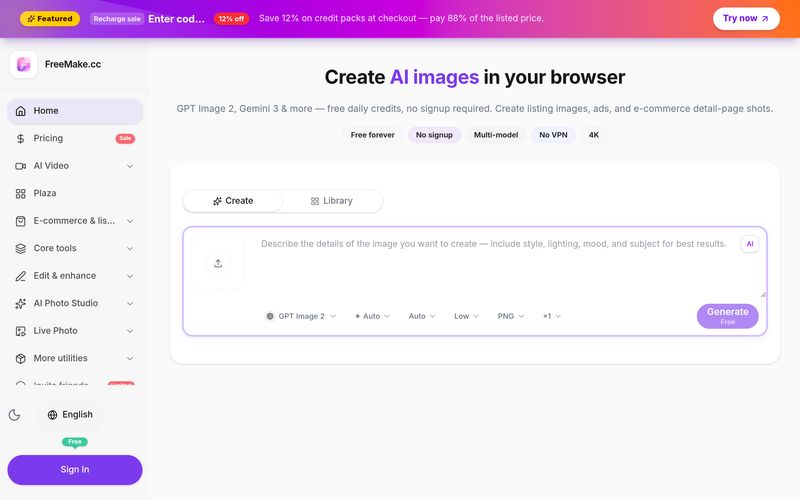
FreeMake.cc is a versatile AI tool that makes Image Generation fast, accessible, and practical directly in your browser. With no signup required to get started, users can generate high-quality AI images using free daily credits and turn simple text prompts into product photos, advertising creatives, social media visuals, illustrations, posters, and e-commerce listing images.
One of the biggest advantages of FreeMake.cc is its multi-model workspace. Depending on your access level, you can work with advanced image generation models such as GPT Image 2, Gemini, Qwen Image 2.0, Nano Banana, Z-Image Turbo, Seedream, Wan, and other premium models. This makes it easy to compare different AI models and choose the output that best matches your creative needs without switching between multiple platforms.
The workflow is simple: choose an AI model, enter a prompt or upload a reference image, then generate and download your result within seconds. Free users can access daily credits and 1K low-quality generation, while paid credits unlock higher-quality 2K/4K outputs, premium models, faster generation, and watermark-free downloads.
Beyond AI Image Generation, FreeMake.cc also provides a collection of browser-based image utilities, including HEIC to JPG conversion, Video to Live Photo, GIF to Live Photo, Image to Live Photo, and image layer splitting. Many of these tools work locally in the browser, providing a more privacy-friendly experience.
For creators, marketers, designers, and e-commerce sellers, FreeMake.cc combines powerful AI tool capabilities with practical image workflows, making it a convenient solution for turning ideas into production-ready visuals quickly.
Pick GPT Image 2, Gemini 3 Pro, Gemini 3.1 Flash, Qwen Image 2.0, or Seedream 4.5 — switch anytime in one workspace.
Describe your image or upload a reference photo for image-to-image. Use templates for product shots, ads, and illustrations.
Click generate and get your image in seconds. Download in 1K free — upgrade for 2K/4K and watermark-free output.
Yes. FreeMake.cc lets you generate AI images without creating an account or providing personal information. Free users get daily credits with 1K resolution output. No credit card required.
No. FreeMake.cc is a separate browser-based AI image generator and photo toolkit — not the legacy Freemake Video Converter desktop software at freemake.com. If you searched for "freemake" video converter, that is a different product. FreeMake.cc focuses on AI image generation (GPT Image 2, Gemini, Qwen) and 40+ free online image tools — no download required.
FreeMake.cc supports GPT Image 2, Gemini 3 Pro, Gemini 3.1 Flash, Qwen Image 2.0, and Seedream 4.5 — all in one workspace. Switch models without leaving the page.
Yes. Images generated on FreeMake.cc can be used for commercial projects including e-commerce listings, advertisements, and social media marketing. Review each model provider's terms and applicable law before publishing.
No VPN is required. FreeMake.cc is accessible globally, including regions where other AI image generators may be restricted.
FreeMake.cc is an AI image workspace in your browser: pick a model, enter a prompt, and generate. Use the workspace on the homepage — no app install required.
Core usage is free for everyday needs; the site is partly funded by ads. Higher resolutions, more quota, or credit packs are optional — see the Pricing page.
No personal OpenAI key or ChatGPT subscription is required. We call models from our servers — just open the site.
We aggregate multiple mainstream image models you can switch in one workspace, and aim to keep the barrier low. Available models are listed on the site.
You can try without signing in. After login you can manage credits, subscriptions, and history where the product supports it.
Download outputs to your device. When logged out we process the minimum data needed to run and secure the service; we don’t show other users’ records to you. Logged-in users can see successful runs linked to their account in the workspace.
Fair-use limits may apply so the service stays sustainable. Extra quota can come from credits or subscriptions — check hints in the workspace and on Pricing.
Credits pay for generations. Buy packs or subscribe when you need higher resolution, more images, or longer validity.
Generations use your daily free credits first. After today's free allowance is used up, paid credits from packs or subscriptions are deducted. Check the estimated cost in the workspace before generating.
Yes. Use our Product Detail Image Generator: upload one product photo, review six AI-drafted prompts, and batch-generate lifestyle, close-up, and feature shots for your listing gallery.
Follow each model provider’s terms (e.g. OpenAI) and applicable law. We deliver outputs as-is; you’re responsible that prompts and results don’t infringe third-party rights.
The site works in mobile browsers (experience varies). If a public API isn’t documented on the site, treat it as unavailable for now.
Plans and quotas may evolve with model costs; purchased rights usually follow the terms at checkout. For issues, use in-site contact or support email — we reply within a reasonable time.
Share practical notes and help others evaluate this tool.
No comments yet. Start the conversation.


AI Image Extender is a free online tool that uses generative AI to expand images beyond their original boundaries. Easily uncrop photos, adjust aspect ratios, and extend backgrounds while preserving quality.

CreateForge AI is a creative workspace that lets you generate images and videos using a variety of AI models, including Nano Banana, Seedream, Grok Imagine, Veo, Flux, GPT Image, and Seedance. It offers prompt writing, model selection, protected quotes, and a private library to store your results.

Free browser-based text-to-image tool with multi-model switching (FLUX, Stable Diffusion, Z Image Turbo, Qwen). No account, no credits, instant download. Host-dependent limits.

SearchSpot is an AI travel planner that compares flights, hotels, restaurants, and transport, and builds a shared itinerary with live prices, AI reasoning, and group collaboration. Free forever.



This comprehensive guide explores the best AI image generators available in 2026, highlighting their unique features, strengths, and ideal use cases. We'll dive deep into each tool's capabilities to help you identify which AI image generator best suits your creative needs.

Google has just launched a powerful AI IDE code editor — now you can really vibe while coding

The best AI Model And AI Tools in 2026,The Most Popular Free AI Model And AI Tools.