订阅AI通讯
您的数据完全安全。我们不会与任何人共享。
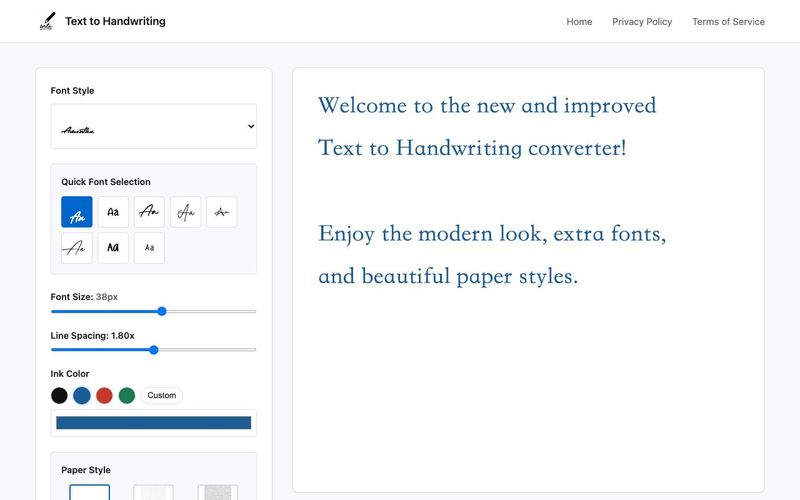
Using an online text to handwriting converter is simple, fast, and requires no software installation. Here's how you can get started in just a few easy steps:
1. Enter Your Text
Start by typing or pasting your content into the input field. Whether it's a short note or a long assignment, the tool processes it instantly.
2. Customize the Style
Choose from various handwriting fonts, pen ink colors (black, blue, red), and a range of paper styles—from plain white sheets to lined paper and decorative backgrounds. Font options support different alphabets including Latin, Devanagari, Arabic, and Cyrillic.
3. Live Preview Your Handwriting
See your handwritten content update in real-time as you type or make changes. This helps you fine-tune before downloading.
4. Download Your Handwritten Output
Once you're satisfied, download your result as a high-resolution PNG image—perfect for printing, submitting assignments, or sharing digitally.
Using the Text to Handwriting Converter is a surprisingly seamless experience, and it perfectly demonstrates how an AI tool can simplify everyday text writing tasks. The tool’s step-by-step process is designed for users of all skill levels, making handwritten-style output accessible without any software installation or technical knowledge. The first step—simply entering your text—highlights the tool’s efficiency. Whether you paste a full essay, a school assignment, or a quick personal note, the Text to Handwriting Converter instantly processes the content, showing how powerful and responsive its AI-driven engine is. There is no lag, no complicated formatting, and no need to adjust layouts manually.
Customization is where this AI tool truly shines. Users can choose from multiple handwriting fonts, ink colors, and paper backgrounds, allowing the final output to closely match their personal preferences or project needs. The inclusion of diverse alphabets—such as Latin, Devanagari, Arabic, and Cyrillic—makes it especially valuable for multilingual users and international students. This level of flexibility sets it apart from typical text writing generators that offer only a few generic styles.
Another standout aspect is the real-time preview. As you type or make adjustments, the handwritten result updates instantly. This live feedback ensures that users can fine-tune spacing, style, and overall visual appearance before downloading, creating a smooth and interactive experience. Once the design is perfected, exporting the final product as a high-resolution PNG image is simple and quick. This makes the tool practical for printing homework, submitting digital assignments, creating aesthetic notes, or sharing personalized handwriting online.
Overall, this Text to Handwriting Converter is an impressive, user-friendly AI tool that elevates text writing by merging customization, speed, and handwriting realism into an effortless process.


Flux 2 Max 是 Flux 2 系列中最先进的版本,专为追求高精度、真实感和生产级视觉输出的创作者而设计。作为一款高端的 AI 图像生成器(AI Image Generator) 与强大的 AI 图像编辑器(AI Image Editor) 的结合体,Flux 2 Max 将图像质量与一致性提升到了全新高度,非常适合专业级创作流程。
随着人工智能的飞速发展,11月成为了全年最具突破性的月份之一。从新一代图像模型和令人惊叹的视频工具,到能够编写代码、构建应用程序、清理杂乱数据,甚至从零开始创建完整学习中心的 AI 助手,应有尽有。无论你是创作者、营销人员、学生、开发者,还是仅仅是一位人工智能爱好者,本月的种种新发现都会让你重新思考人工智能的无限可能。

2025年最佳AI大模型与AI工具,最受欢迎的免费AI大模型与AI工具。

With the launch of the iOS 18.1 Beta version, registered developers can now experience some of the features of Apple AI, a cutting-edge addition to AI tools.