Subscribe to AI newsletter
Your data is completely secure with us. We don't share it with anyone.
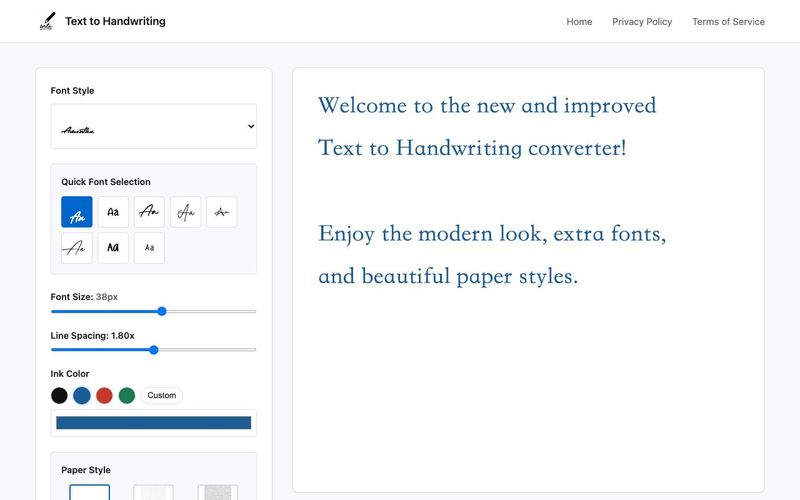
Using an online text to handwriting converter is simple, fast, and requires no software installation. Here's how you can get started in just a few easy steps:
1. Enter Your Text
Start by typing or pasting your content into the input field. Whether it's a short note or a long assignment, the tool processes it instantly.
2. Customize the Style
Choose from various handwriting fonts, pen ink colors (black, blue, red), and a range of paper styles—from plain white sheets to lined paper and decorative backgrounds. Font options support different alphabets including Latin, Devanagari, Arabic, and Cyrillic.
3. Live Preview Your Handwriting
See your handwritten content update in real-time as you type or make changes. This helps you fine-tune before downloading.
4. Download Your Handwritten Output
Once you're satisfied, download your result as a high-resolution PNG image—perfect for printing, submitting assignments, or sharing digitally.
Using the Text to Handwriting Converter is a surprisingly seamless experience, and it perfectly demonstrates how an AI tool can simplify everyday text writing tasks. The tool’s step-by-step process is designed for users of all skill levels, making handwritten-style output accessible without any software installation or technical knowledge. The first step—simply entering your text—highlights the tool’s efficiency. Whether you paste a full essay, a school assignment, or a quick personal note, the Text to Handwriting Converter instantly processes the content, showing how powerful and responsive its AI-driven engine is. There is no lag, no complicated formatting, and no need to adjust layouts manually.
Customization is where this AI tool truly shines. Users can choose from multiple handwriting fonts, ink colors, and paper backgrounds, allowing the final output to closely match their personal preferences or project needs. The inclusion of diverse alphabets—such as Latin, Devanagari, Arabic, and Cyrillic—makes it especially valuable for multilingual users and international students. This level of flexibility sets it apart from typical text writing generators that offer only a few generic styles.
Another standout aspect is the real-time preview. As you type or make adjustments, the handwritten result updates instantly. This live feedback ensures that users can fine-tune spacing, style, and overall visual appearance before downloading, creating a smooth and interactive experience. Once the design is perfected, exporting the final product as a high-resolution PNG image is simple and quick. This makes the tool practical for printing homework, submitting digital assignments, creating aesthetic notes, or sharing personalized handwriting online.
Overall, this Text to Handwriting Converter is an impressive, user-friendly AI tool that elevates text writing by merging customization, speed, and handwriting realism into an effortless process.



This comprehensive guide explores the best AI image generators available in 2026, highlighting their unique features, strengths, and ideal use cases. We'll dive deep into each tool's capabilities to help you identify which AI image generator best suits your creative needs.

Google has just launched a powerful AI IDE code editor — now you can really vibe while coding

The best AI Model And AI Tools in 2026,The Most Popular Free AI Model And AI Tools.