Subscribe to AI newsletter
Your data is completely secure with us. We don't share it with anyone.
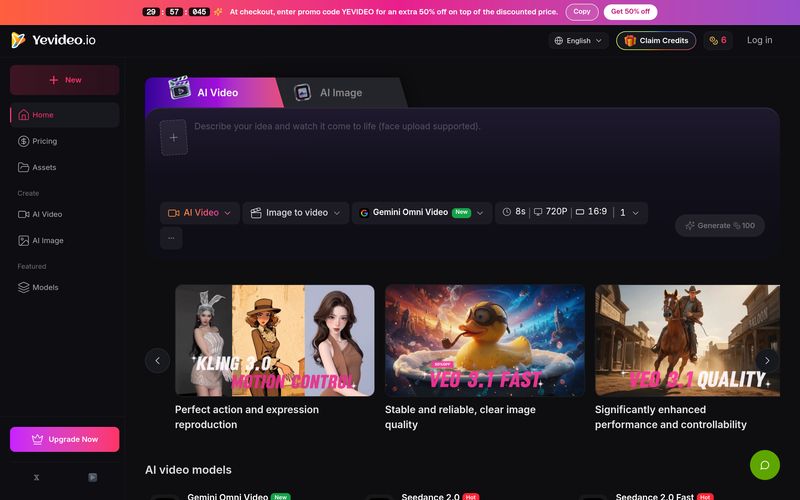
First, decide what you want to generate (AI video or AI image) and what you care about (e.g., motion imitation, text rendering, style). Then read the model intro cards—each model highlights its strengths. For example, if you want to replicate a dance video and you mainly need accurate motion imitation, Kling 3.0 is a great fit. If you’re generating a poster image that needs readable text, Nano Banana Pro is typically a better choice than Nano Banana because it handles text much better.
We support a wide range of workflows including text-to-image, image-to-image, text-to-video, image-to-video, video-to-video, and AI video editing. A common path is: start with text-to-image to visualize an idea, use image-to-image to iterate variations or refine the image, and then turn that still into motion with image-to-video—so you can turn what’s in your head into a real video step by step.
Yes. Right now, we don’t support sending a freshly generated image directly into the image-to-video workspace in one click. You’ll need to download the image first, then upload it into image-to-video and continue from there. This is also one of the recommended ways to create videos: video generation is relatively expensive, and using a strong first frame helps lock the mood and style so you’re less likely to waste credits on results you don’t like.
Generating AI images and videos requires significant compute, so each run costs credits. We deduct credits based on the selected model and settings such as resolution, duration, and number of outputs. You’ll usually see an estimated credit cost before generating. After the job completes, you can review the actual credit changes in My Credits.
Currently, there are three main ways to get free credits: (1) a welcome bonus for new users when you register, so you can try core features; (2) daily check-ins—our way to thank you for using and supporting Yevideo; and (3) feedback rewards—if you share suggestions and your feedback is adopted, we’ll grant bonus credits. In the future, we’ll also add an invite program where you can earn credits when friends register successfully—stay tuned.
Can I use outputs commercially? What should I watch for?
Yes. If you’re on a paid plan subscriber, you can use Yevideo outputs commercially. Whether you’re creating ads, marketing assets, product explainer videos, or other business content, Yevideo can support your needs.
As AI-powered creative workflows become increasingly sophisticated, choosing the right platform often comes down to flexibility, control, and production efficiency. Based on its FAQ and feature ecosystem, Yevideo AI positions itself as a highly versatile AI tool built to simplify complex Video Generation workflows while giving creators access to multiple specialized AI models in one place. Rather than forcing users into a one-size-fits-all approach, Yevideo AI provides a model-driven environment where creators can select the best engine depending on their specific project goals.
One of the biggest advantages of Yevideo AI is how intelligently it approaches model selection. Different creative tasks require different strengths, and the platform makes this process surprisingly practical. For example, users focused on motion imitation or recreating dance movements can choose Kling 3.0 Motion Control, while creators producing poster-style visuals with readable typography may find Nano Banana Pro better suited because of its stronger text rendering capabilities. This model diversity makes Yevideo AI feel less like a single generator and more like a creative studio tailored to different production needs.
The platform also supports a powerful end-to-end workflow for Video Generation. Instead of limiting users to only text prompts, Yevideo AI enables multiple creative paths including text-to-image, image-to-image, text-to-video, image-to-video, video-to-video, and AI video editing. A particularly useful workflow starts with text-to-image generation for concept development, then refines visuals through image-to-image editing before finally converting the still image into a dynamic video. This staged approach helps creators maintain style consistency while reducing wasted credits on failed outputs.
Another thoughtful aspect of Yevideo AI is its practical recommendation for image-to-video production. Users can first create a strong visual frame, download it, and then upload it into the video workspace. While this extra step may seem minor, it actually improves quality control significantly because a strong first frame helps preserve mood, style, and character consistency throughout the Video Generation process.
The platform’s credit system is also relatively transparent. Estimated credit costs are shown before generation, allowing creators to better manage budgets depending on factors such as resolution, duration, and output quantity. New users can explore the platform through welcome bonus credits, daily check-ins, and feedback rewards, lowering the barrier to experimentation.
Commercial usability is another major strength. Paid subscribers can use generated content for advertisements, marketing assets, explainer videos, and other business projects, making Yevideo AI suitable for both personal creativity and professional production.
Overall, Yevideo AI is an impressive AI tool for advanced Video Generation workflows. By combining multiple AI models, flexible creation paths, transparent pricing, and commercial-friendly outputs, Yevideo AI offers creators a more practical and scalable way to turn ideas into polished visual content.



This comprehensive guide explores the best AI image generators available in 2026, highlighting their unique features, strengths, and ideal use cases. We'll dive deep into each tool's capabilities to help you identify which AI image generator best suits your creative needs.

Google has just launched a powerful AI IDE code editor — now you can really vibe while coding

The best AI Model And AI Tools in 2026,The Most Popular Free AI Model And AI Tools.