How to use Wisegrid

Wisegrid

Wisegrid is designed to feel familiar to anyone who works in spreadsheets. Here is how to get started:

  1. Start your 7-day free trial. Sign up with Google or email in about 20 seconds. No credit card is required, so nothing can be charged automatically during the trial.
  2. Bring your existing data. Import any Excel workbook from the File menu, or use the self-serve Smartsheet importer: paste an API token from your current tool and Wisegrid discovers every workspace, folder and sheet you have access to. The token stays revocable and the importer only calls read endpoints, never write. Anything that does not translate cleanly is flagged for review. Prefer to skip it? Wisegrid offers free concierge migration, where the founder personally migrates your sheets, formulas and attachments, usually within a day.
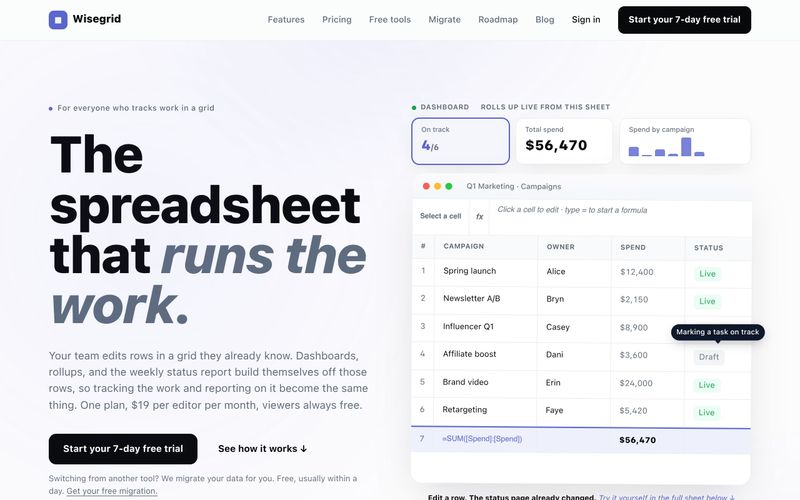
  3. Work in the grid. Use familiar rows, columns, formulas, hierarchies, copy and paste, and cross-sheet references. Type = to start a formula, paste a whole range, stage your edits, and save with one shortcut. Wisegrid includes 119 Excel-compatible functions with [Column]@row references, autocomplete and signature help.
  4. Add views and dashboards. View the same underlying data as a grid, Gantt chart, board or calendar. Create live dashboards, charts, portfolio reports and project summaries that roll up straight from your sheets. Drag, resize and share widgets; every widget resolves through the viewer's own access.
  5. Collect requests with forms. Build multi-page forms with conditional logic, save-and-resume and your own branding. Submissions land as rows instantly.
  6. Automate workflows. Set up notifications, assignments, row moves and multi-step approvals on row, date and new-row triggers. Full run history is available with no monthly run cap.
  7. Use AI in formulas. When a column needs judgment, such as reading a note and tagging it, use AI functions like =CLASSIFY, =EXTRACT, =SUMMARIZE and freeform =AI(). Fill the formula down a column and results live in your sheet like any other value. Your plan includes a $5/month AI allowance, metered to the cent with a hard ceiling.
  8. Set permissions and collaborate. Everything is private by default. Share a whole project, one sheet, or one person's slice of a view, by person, group or domain. SSO and MFA are included. Presence, comments and attachments appear on every row, with row-level conflict catches so nobody's work silently disappears.
  9. Reuse project blueprints. Save any project as a reusable blueprint and stamp out governed copies in under a minute, including formulas, automations and dashboards.
  10. Connect and export. Use the REST API and signed webhooks to connect Wisegrid with external systems. Export everything anytime: one Export Bundle downloads each sheet as Excel plus every attachment.

Wisegrid is priced at one plan: $19 per editor per month with every feature included. You only pay for editors; view-only collaborators are always free, however many you invite. There is no seat minimum, and billing prorates automatically when you add or remove editors.

Summary and Review:

Start a 7-day free trial, import existing Excel or Smartsheet data (or let the founder migrate it for free), then work in the familiar grid. Add Gantt, board and calendar views, dashboards, reports, forms, automations and AI formulas in cells. One plan at $19 per editor per month with free view-only collaborators.

Subscribe to AI newsletter
Your data is completely secure with us. We don't share it with anyone.