Subscribe to AI newsletter
Your data is completely secure with us. We don't share it with anyone.
One-click Sora watermark remover online free: clean Sora videos online with AI inpainting. Fast previews, smooth motion, simple downloads.
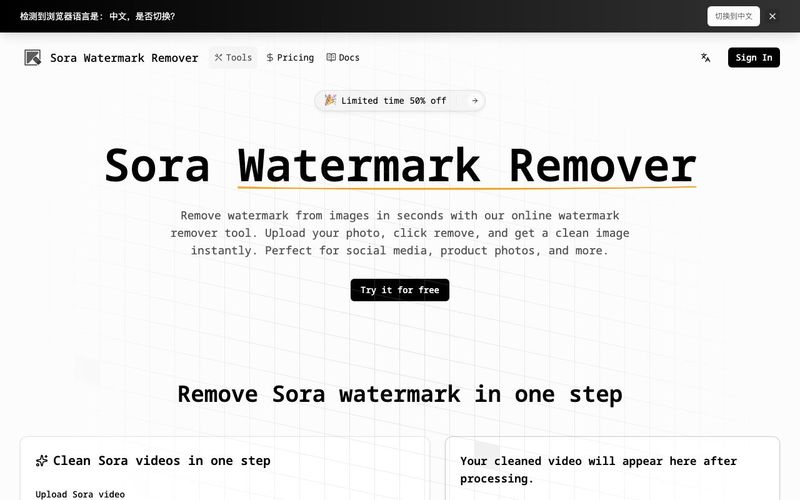
In the world of AI-generated content and image generation, watermarks can often get in the way of a polished final result. Sora Watermark Remover is a powerful AI tool designed to remove visible Sora watermarks from videos and images instantly, producing clean, professional visuals while maintaining natural motion and details. Whether you’re working with product photos, social media clips, or creator portfolios, this tool streamlines the editing process without compromising quality.
At its core, Sora Watermark Remover leverages AI inpainting technology to accurately detect and reconstruct areas covered by watermarks. Unlike simple blur or overlay removal methods, the AI analyzes surrounding pixels and motion cues to rebuild the underlying content, ensuring that the video or image looks seamless. This makes it particularly effective for dynamic Sora-style watermarks, including text overlays, corner logos, and semi-transparent marks, even across fast-moving scenes.
The tool’s workflow is remarkably user-friendly. Creators simply upload their image or video, click to remove the watermark, preview the results, and download the clean file. The entire process is optimized for speed, allowing users to process short clips quickly while maintaining high-quality output. For more complex edits, the Sora 2-ready workflow tracks watermarks frame by frame, reducing flicker and keeping fills consistent throughout motion-heavy sequences.
Sora Watermark Remover is ideal for a variety of applications. E-commerce sellers can polish product listings and promotional videos, social media creators can prepare TikTok, Reels, or Shorts clips without distractions, and agencies or freelancers can deliver client-ready visuals efficiently. The tool also emphasizes privacy, processing only the uploaded content and ensuring user data remains secure.
Trusted by over 999 creators and integrated into 20+ watermark removal workflows, Sora Watermark Remover demonstrates the power of combining AI tools with image generation workflows. By providing precise, context-aware editing in just a few clicks, it enables creators to save time, enhance visual quality, and focus on producing content that truly shines.
For anyone working in AI content creation, video editing, or digital marketing, Sora Watermark Remover is more than just a utility—it’s a professional-grade AI tool that transforms how watermarks are handled in the modern creative workflow.
Drag and drop your file to start the sora watermark remover process. Some workflows also support a share link for a sora watermark remover online experience. If you’re using a sora 2 watermark remover, make sure the link is public or the upload is the original export for best detection.
Our watermark remover sora workflow scans frames to locate typical Sora overlays (text, logos, or semi-transparent marks). The sora ai watermark remover free approach is fully automatic—no masking, no keyframes, no manual tracking, even when the mark shifts as in some sora 2 watermark remover clips.
Preview before you download. A good sora video watermark remover should minimize blur and reduce artifacts around the removed area. If the watermark moves or changes, rerun the sora 2 watermark remover free workflow with the original file for better frame consistency.
Download your processed video and keep the same pacing, framing, and audio (when applicable). This sora watermark remover free flow is built for fast publishing: social posts, product demos, ads, and internal reviews. Always confirm you have rights to edit and share the video you process with a free sora watermark remover.
It’s a sora watermark remover online workflow—no installation required. You can upload a video (and in some workflows paste a share link) and run the sora watermark remover directly in your browser.
Yes. The tool is designed as a sora 2 watermark remover with frame-to-frame tracking. If your watermark shifts position, reprocessing the original export often improves stability. Many users start with a sora 2 watermark remover free sample run to validate the look before processing longer clips.
You can use the sora watermark remover free flow to test and process clips without installing software. People commonly search for sora watermark remover free or free sora watermark remover to quickly validate output quality. Availability of free usage may depend on current limits, but the core workflow is designed to stay simple and accessible.
Yes, it’s built as a sora ai watermark remover free workflow using AI detection plus reconstruction (inpainting). It identifies the watermark area and fills it using nearby pixels and motion cues so the result looks more natural than simple blur.
The goal of this sora video watermark remover is to keep the scene natural and reduce visible artifacts. Like any watermark removal, results depend on the background complexity and watermark size. For best results, use the highest-quality source file and, for moving marks, run the sora 2 watermark remover workflow instead of low-resolution re-uploads.
Use this sora watermark remover only on videos you own or have explicit permission to edit and distribute. The tool helps remove overlays, but you are responsible for rights, licensing, and platform policies. This guidance applies whether you use a sora watermark remover online workflow, a sora watermark remover free option, or a sora 2 watermark remover free trial.
Share practical notes and help others evaluate this tool.
No comments yet. Start the conversation.


Explore curated Codex skins, save favorites, and customize Codex Desktop on macOS or Windows with native UI preserved.

NanoBananaAI is a free AI image generator powered by Nano Banana Pro, Google's advanced image model. Create, edit, and transform stunning visuals with natural language prompts. No design skills needed.

Create faceless reels from an idea or script. Review the hook, voiceover, visuals, captions, and scene plan before generation.

Discover Nano Banana, the next-generation multimodal model for context-aware image generation and editing. Combine text and image prompts to create, edit, and refine visuals with unmatched consistency and style.



This comprehensive guide explores the best AI image generators available in 2026, highlighting their unique features, strengths, and ideal use cases. We'll dive deep into each tool's capabilities to help you identify which AI image generator best suits your creative needs.

Google has just launched a powerful AI IDE code editor — now you can really vibe while coding

The best AI Model And AI Tools in 2026,The Most Popular Free AI Model And AI Tools.