Subscribe to AI newsletter
Your data is completely secure with us. We don't share it with anyone.
PicRemake offers free AI image transformation left-panels with multiple models and sizes for easy image creation and editing.
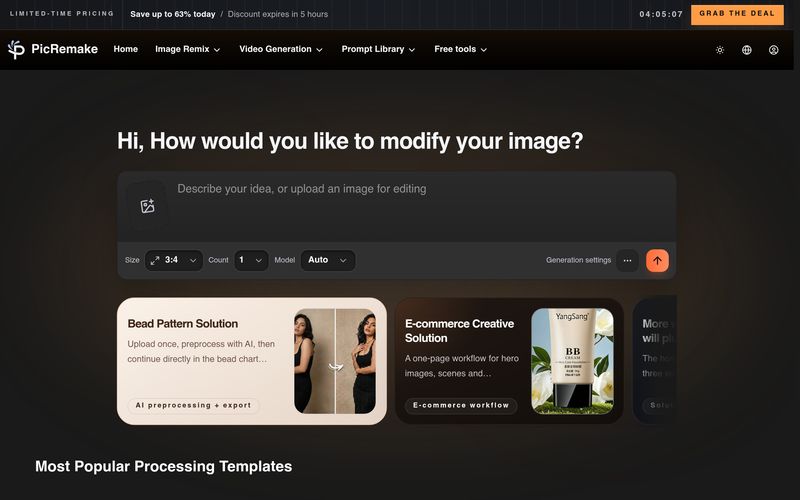
PicRemake stands out as an all-in-one AI tool dedicated to premium Image Generation and intelligent image transformation. It integrates mainstream AI capabilities, abundant creative templates, and one-stop editing functions, helping creators, marketers, and designers deliver high-quality visual assets effortlessly.
Rich Processing Templates & Scenario Coverage
As a top-tier Image Generation platform, PicRemake offers the most popular ready-to-use processing templates to fit diverse scenarios:
Core Advantages of PicRemake AI Tool
Why choose PicRemake for Image Generation and image processing? It meets core demands for production-ready output, fast iteration, and secure team collaboration:
Even new users can master this AI tool in three easy steps:
Powered by Leading AI Models
PicRemake empowers Image Generation with globally advanced AI technologies, including Runway, Google, Magnific, Kling, Flux, ChatGPT, and ElevenLabs. The powerful model integration ensures stable output, rich details, and diverse creative styles for all image creation needs.
User Praise & Industry Recognition
Thousands of professional designers, content creators, marketing directors, and e-commerce entrepreneurs rely on PicRemake as their go-to AI tool for Image Generation. Users highly recognize its efficient workflow, precise AI background removal, remarkable productivity improvement, and direct boost to commercial conversion rates. It simplifies prototype design, batch visual creation, and post-production polishing, becoming an indispensable helper for creative practitioners.
Select from our wide range of AI-powered processing tools
Upload your image or choose from our template library
Get your processed image and share it with the world
Are the exports really watermark-free?
Yes, all exports are completely watermark-free and ready for commercial use. We believe in providing professional-quality results without any branding restrictions.
How many times can I edit an image?
There's no limit! You can edit and re-edit your images as many times as you need. Our platform supports unlimited iterations to help you achieve the perfect result.
What file formats are supported?
We support all major image formats including JPG, PNG, WEBP, GIF, and more. You can upload images in any common format and export in your preferred format.
Is my data secure?
Absolutely. We use industry-standard encryption and never share your data with third parties. Your images are processed securely and automatically deleted after processing unless you choose to save them.
How accurate is the background removal?
Our AI-powered background removal achieves 99%+ accuracy for most images. It works exceptionally well with clear subjects and can handle complex backgrounds including hair, fur, and transparent objects.
Can I use the generated images commercially?
Yes, all generated and processed images are free to use for commercial purposes. There are no licensing restrictions or attribution requirements.
What AI models do you use?
We integrate with leading AI models including Runway, Flux, Stable Diffusion, and more. You can compare results from multiple models to find the best output for your needs.
How long does image processing take?
Most operations complete in 5-30 seconds depending on the complexity. Simple tasks like background removal are typically done in under 10 seconds, while more complex operations may take up to a minute.
Do I need to create an account?
You can try most features without an account, but creating a free account gives you access to higher resolution exports, more processing credits, and the ability to save your work.
What's the maximum image size I can upload?
Free users can upload images up to 10MB, while registered users can upload images up to 50MB. We support high-resolution images up to 4096x4096 pixels.
Can I batch process multiple images?
Yes, our platform supports batch processing for many operations. You can upload multiple images and process them simultaneously to save time.
How do I get support if I encounter issues?
You can reach our support team through the feedback button, email, or our help center. We typically respond within 24 hours and are committed to helping you succeed.
Share practical notes and help others evaluate this tool.
No comments yet. Start the conversation.


AI Image Extender is a free online tool that uses generative AI to expand images beyond their original boundaries. Easily uncrop photos, adjust aspect ratios, and extend backgrounds while preserving quality.

CreateForge AI is a creative workspace that lets you generate images and videos using a variety of AI models, including Nano Banana, Seedream, Grok Imagine, Veo, Flux, GPT Image, and Seedance. It offers prompt writing, model selection, protected quotes, and a private library to store your results.

Free browser-based text-to-image tool with multi-model switching (FLUX, Stable Diffusion, Z Image Turbo, Qwen). No account, no credits, instant download. Host-dependent limits.

SearchSpot is an AI travel planner that compares flights, hotels, restaurants, and transport, and builds a shared itinerary with live prices, AI reasoning, and group collaboration. Free forever.



This comprehensive guide explores the best AI image generators available in 2026, highlighting their unique features, strengths, and ideal use cases. We'll dive deep into each tool's capabilities to help you identify which AI image generator best suits your creative needs.

Google has just launched a powerful AI IDE code editor — now you can really vibe while coding

The best AI Model And AI Tools in 2026,The Most Popular Free AI Model And AI Tools.