Subscribe to AI newsletter
Your data is completely secure with us. We don't share it with anyone.
Create and edit AI images with GPT Image 2 using prompts, reference images, quality controls, aspect ratios, and downloadable results.
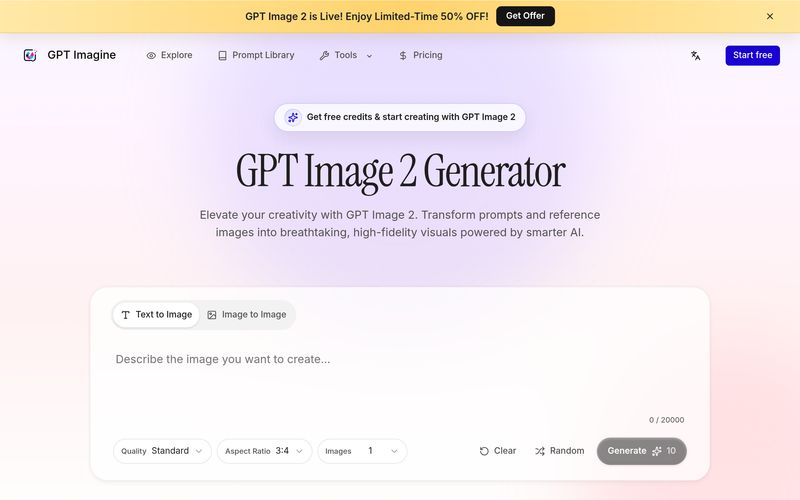
As visual content becomes increasingly important for marketing, branding, and digital storytelling, creators are searching for a reliable AI tool that goes beyond simple image generation. GPT Image stands out as a next-generation solution in the world of Image Generation, helping users transform prompts and reference images into polished, high-quality visuals with remarkable detail, flexibility, and creative control.
Unlike many basic AI image generators, GPT Image is designed for practical creative work. Whether you are building marketing assets, product visuals, concept art, editorial illustrations, or social media graphics, this AI tool focuses on turning rough ideas into production-ready results. With stronger prompt understanding, better visual consistency, and more realistic rendering, GPT Image helps users move from imagination to execution faster.
One of the most impressive strengths of GPT Image is its ability to understand detailed and complex prompts. Users can describe multiple visual requirements at once — including subjects, environments, mood, lighting, composition, textures, colors, framing, and artistic style — and the model translates those instructions into cohesive visuals.
This makes GPT Image especially valuable for advertising creatives, product marketers, designers, and content creators who need more predictable and controllable Image Generation results instead of random artistic outputs.
A major advantage of GPT Image is its improved in-image text generation. Posters, product labels, packaging, signs, stickers, and marketing copy appear cleaner and more readable compared to older models. For businesses building promotional materials, this removes much of the frustration associated with distorted or unreadable text.
Beyond typography, GPT Image excels at material realism. Whether describing glass reflections, soft fabric textures, metallic surfaces, ceramic materials, skin tones, studio lighting, or cinematic shadows, the model produces visuals with stronger depth and premium visual quality.
Another standout feature of GPT Image is creative flexibility. The same prompt can evolve into multiple visual directions, including cinematic product photography, editorial illustration, concept art, social graphics, or highly realistic renders. Instead of switching between different creative platforms, users can experiment inside one streamlined AI tool.
The image-to-image mode adds another layer of control. Users can upload a reference image and describe desired modifications, helping maintain character consistency, product identity, or visual structure while refining creative direction.
Unlike experimental generators focused only on novelty, GPT Image supports practical use cases such as campaign visuals, ecommerce product images, thumbnails, posters, presentations, and social content. High-resolution, 4K-ready image quality ensures outputs remain sharp enough for professional usage across multiple formats and screen sizes.
Overall, if you are looking for an advanced AI tool specializing in Image Generation, GPT Image offers a compelling combination of prompt accuracy, visual realism, multilingual text rendering, and workflow flexibility. From first concepts to polished marketing assets, GPT Image helps creators generate visuals that feel intentional, professional, and ready for real-world projects.
GPT Image 2 is an image generation and image editing model used to create visuals from text prompts and reference images. On this page, it is presented as a practical generator rather than a technical demo. You can describe a new image from scratch, upload an image to guide an edit, choose quality, set an aspect ratio, and generate one or more downloadable results. The strongest use cases are visual drafts that need clear instruction following: product scenes, ads, posters, thumbnails, concept art, style exploration, and reference-based variations. A good prompt should name the subject, environment, composition, lighting, style, and any constraints that matter.
The generator keeps the workflow simple. In Text to Image mode, you enter a prompt and the model creates a new image from that written direction. In Image to Image mode, you add a reference image first, then write what should change or what new direction you want. Before generation, you can choose quality, aspect ratio, and image count. The page then shows the task status and displays the final image grid when the request is complete. This approach is useful because image generation often improves through iteration. You can keep the prompt, adjust the controls, change the reference, and try again.
You can use GPT Image 2 for marketing graphics, social media posts, ecommerce product scenes, blog headers, app launch visuals, YouTube thumbnails, posters, character concepts, mood boards, interior concepts, and polished drafts for design review. It is also useful for editing a source image into a new direction, such as changing the background, exploring another visual style, or creating a cleaner composition. The key is to write a prompt that explains the job instead of only naming a style. The model performs better when you include the intended format, subject details, scene, lighting, and what should be avoided.
Yes. GPT Image 2 is a strong choice when you need text to image generation that follows a more detailed brief. For example, a vague prompt like "a product photo" gives the model little direction, while a prompt that describes the product, surface, lighting, camera angle, background, and usage context gives it a clearer target. Text to image mode is best for starting from a blank page, exploring new campaign directions, testing a visual idea, or creating several options before deciding which route to refine. Use concrete nouns and production details instead of long strings of generic adjectives.
Yes. Image to Image mode is designed for reference-based generation and editing. Upload an image, preview it locally, and then tell the model what should change. For better results, write the edit in two parts: first explain the change, then explain what should stay the same. For example, you might ask for a new studio background while preserving the product shape, label placement, camera angle, and lighting direction. This helps the model keep the useful parts of the source image while changing the parts that matter. It is a practical workflow for product visuals, style variations, and creative refinement.
A reliable prompt is specific, visual, and scoped. Start with the main subject, then describe the setting, composition, camera perspective, lighting, mood, color palette, material details, and final use case. If there is text in the image, write the exact wording and keep it short. If you are editing a reference image, add a preservation list that states what must not change. Avoid prompts that only say "make it better" or "more professional" because they leave too much open to interpretation. The model can follow detailed direction, but the direction must be concrete enough to guide the output.
Choose Standard when you are exploring many ideas and do not need maximum polish. Choose HD when you want a balanced result for everyday production drafts, social posts, thumbnails, product mockups, or design review. Choose Ultra when the result needs more refinement and the prompt is already strong enough to justify the higher credit cost. A practical workflow is to test with Standard or HD, improve the prompt, then move to Ultra for the version you are most likely to use. Quality affects cost, so the best setting depends on whether you are exploring or finalizing.
Choose the aspect ratio based on where the image will be used. Use 1:1 for square posts, product cards, and profile-style compositions. Use 4:3 or 3:2 for balanced web visuals and product scenes. Use 16:9 for banners, hero images, videos, and presentation covers. Use 9:16 for vertical stories, reels, and mobile-first posts. The generator can create stronger layouts when the prompt and ratio agree with the final channel. If you ask for a wide website hero but choose a vertical ratio, important subjects may feel cramped or misplaced.
Credits are calculated from the selected quality tier and the number of images. Standard costs 10 credits per image, HD costs 50 credits per image, and Ultra costs 150 credits per image. If you create four HD images, the task costs four times the single-image HD price. The generator shows the estimated cost before you click Generate, so experimentation is easier to plan. Aspect ratio changes the shape of the result, but the MVP pricing is based on quality and image count. If a generation fails, the task flow is designed to surface a readable error state.
Start by writing the prompt like a creative brief. Name the subject, audience, purpose, scene, visual style, lighting, and composition. If a brand-like result is needed, describe the look without relying on vague words such as premium, modern, or beautiful by themselves. For image edits, say what changes and what stays locked. Generate one or two images first, study what missed the mark, then revise the prompt with more concrete constraints. If text needs to appear inside the image, keep it short and verify the result because image models can still struggle with precise typography.
GPT Image 2 is useful for product concepts, background exploration, catalog-style drafts, packaging ideas, and ecommerce creative tests. It works best when you describe the product clearly and provide a reference image when the exact shape, label, or visual identity matters. For example, you can upload a product image and ask for a clean studio scene, seasonal background, or lifestyle context while preserving the main object. The output should still be reviewed by a human before commercial use, especially if exact labels, proportions, or compliance details are important. Treat the generator as a fast production assistant, not a replacement for final approval.
Yes. GPT Image 2 is a strong fit for marketing teams and creators who need frequent visual variation. You can generate campaign concepts, post backgrounds, video thumbnail ideas, launch graphics, event visuals, and ad drafts without opening a full design tool first. The best results come from prompts that include the channel, audience, message, visual hierarchy, and mood. For social media, choose the aspect ratio before generation so the layout matches the platform. For campaigns, use the generator to explore multiple directions quickly, then move the strongest image into your normal review and design process.
If generation fails, first check whether the prompt is empty, too long, or asking for something the system cannot process. If you are using Image to Image mode, make sure the reference image uploaded correctly and that the edit request is clear. If the image completes but looks wrong, revise the prompt with more specific constraints instead of only adding adjectives. Say what the subject is, where it is, how it is framed, what style is expected, and what should not appear. If a result is close, keep the useful direction and make one focused change at a time.
Share practical notes and help others evaluate this tool.
No comments yet. Start the conversation.


Explore curated Codex skins, save favorites, and customize Codex Desktop on macOS or Windows with native UI preserved.

NanoBananaAI is a free AI image generator powered by Nano Banana Pro, Google's advanced image model. Create, edit, and transform stunning visuals with natural language prompts. No design skills needed.

Create faceless reels from an idea or script. Review the hook, voiceover, visuals, captions, and scene plan before generation.

Discover Nano Banana, the next-generation multimodal model for context-aware image generation and editing. Combine text and image prompts to create, edit, and refine visuals with unmatched consistency and style.



This comprehensive guide explores the best AI image generators available in 2026, highlighting their unique features, strengths, and ideal use cases. We'll dive deep into each tool's capabilities to help you identify which AI image generator best suits your creative needs.

Google has just launched a powerful AI IDE code editor — now you can really vibe while coding

The best AI Model And AI Tools in 2026,The Most Popular Free AI Model And AI Tools.