Subscribe to AI newsletter
Your data is completely secure with us. We don't share it with anyone.
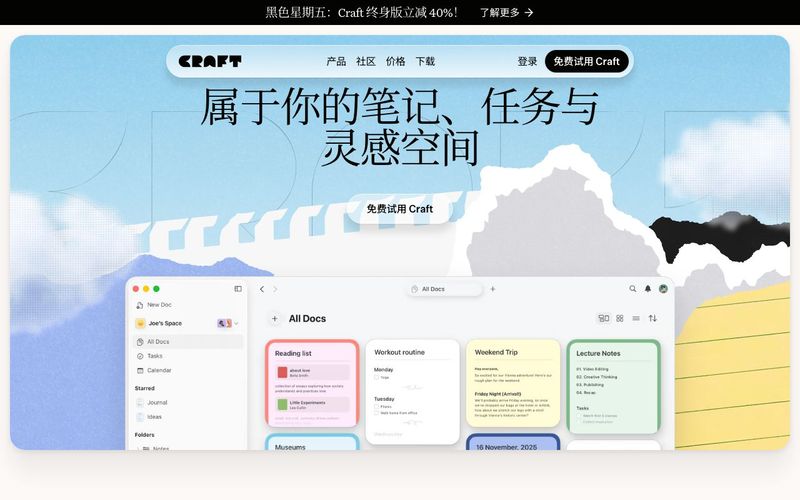
Yes. Craft supports macOS, iOS, Windows, and Web, with automatic cloud syncing. You can switch seamlessly between your phone, tablet, and computer and continue editing anytime.
Yes. Craft includes built-in offline capabilities — you can create and edit pages and documents even without an internet connection. Everything will sync automatically once you’re back online.
Yes. Craft allows you to embed images, PDFs, web links, media, and more into your pages, with automatic previews. This makes it ideal for organizing resources, research materials, or structured notes.
Yes. You can insert To-Do lists and tasks directly inside documents, and use Collections or Spaces to organize projects and workflows. It’s great for simple task management, study planning, and everyday note-taking.
Yes. Craft supports exporting to multiple formats, including PDF and Markdown. It also supports collaboration, shared spaces, and real-time multi-user editing.
Craft continues to solidify its position as one of the most versatile and modern AI Office Tools, offering a seamless experience across devices, powerful offline capabilities, and highly flexible content creation features. As an AI tool designed for productivity, Craft succeeds in bridging the gap between note-taking, document creation, task management, and collaborative work.
One of Craft’s biggest strengths is its multi-device support. Whether you're working on macOS, iOS, Windows, or directly through the Web, Craft keeps your documents automatically synced in the cloud. This makes switching between your phone, tablet, and computer completely frictionless—ideal for professionals, students, and creators who work on the go. This level of synchronization is a hallmark of top-tier AI Office Tools, ensuring your ideas are always accessible when inspiration strikes.
Craft’s offline editing capabilities set it apart from many other AI-powered productivity apps. You can create, edit, and reorganize documents without any internet connection, and the moment you're online again, everything syncs flawlessly. This makes Craft not just convenient but reliable, especially for users who need uninterrupted access during travel, remote work, or research environments.
Craft’s support for embedding external files adds another layer of versatility. Whether you need to include images, PDFs, links, videos, or research material, Craft handles these elements with automatic previews that enhance readability and organization. For academic work, resource libraries, design references, or meeting documentation, this feature transforms Craft into a powerful hub for structured thinking.
The platform also serves as an effective personal and professional task manager. Users can insert To-Do lists directly into documents, connect actionable items with notes, and use Spaces or Collections to organize projects. This integration of writing and planning is a defining characteristic of advanced AI Office Tools, helping users maintain clarity and momentum in daily workflows.
Finally, Craft's export and sharing options—PDF, Markdown, sharing links, and real-time collaboration—make it an ideal tool for teams and individuals alike. Whether you're creating documents to present, share, or archive, Craft’s exporting capabilities ensure compatibility and ease.
Overall, Craft is a powerful, thoughtfully designed AI tool that enhances productivity, creativity, and organization across every stage of your workflow.



This comprehensive guide explores the best AI image generators available in 2026, highlighting their unique features, strengths, and ideal use cases. We'll dive deep into each tool's capabilities to help you identify which AI image generator best suits your creative needs.

Google has just launched a powerful AI IDE code editor — now you can really vibe while coding

The best AI Model And AI Tools in 2026,The Most Popular Free AI Model And AI Tools.