訂閱 AI 電子報
您的資料完全安全。我們不會與任何人分享。
Convert photos to drawings with AI. Transform any picture into pencil sketches, watercolor paintings, and artistic drawings in seconds. Free to try.
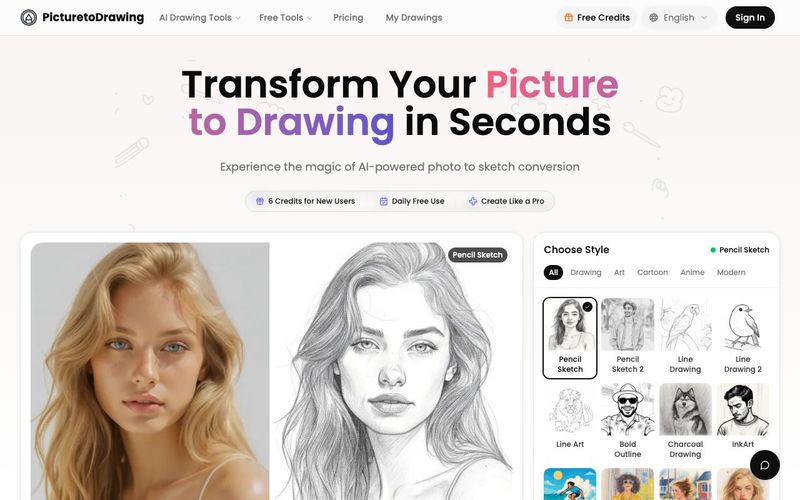
Picture to Drawing AI is a powerful and intuitive AI tool designed to transform ordinary photos into stunning artistic drawings within seconds. Built with advanced image generation technology, this tool lets anyone convert pictures into pencil sketches, watercolor paintings, line art, and color-pencil illustrations with professional artistic quality—completely free to try. Whether you're an artist, designer, marketer, or simply someone who loves creative visuals, Picture to Drawing AI makes it effortless to turn photos into hand-crafted artwork.
Professional-Quality Image Generation
What sets Picture to Drawing AI apart is its authentic artistic rendering. Every transformation preserves natural shadows, depth, texture, and fine details, resulting in artwork that looks like it was drawn by a real artist—not generated by software. High-resolution output ensures your converted drawings are perfect for printing, framing, and sharing across platforms.
Privacy is built into the core of this AI tool. All photos are processed securely and automatically deleted after use, so your images always remain private.
Multiple Artistic Styles Powered by Advanced AI
With this image generation AI tool, users can choose from a range of professionally crafted drawing styles:
Pencil Sketch for realistic graphite shading and timeless artwork
Line Drawing for clean, minimalistic contours and bold structure
Color Pencil Drawing for rich, layered color and warm artistic detail
Watercolor Painting for soft brushstrokes and dreamy, fluid tones
Each style recreates the unique aesthetics of hand-drawn art with exceptional accuracy.
Fast, Versatile, and Perfect for Any Creative Project
Picture to Drawing AI processes photos instantly, delivering high-quality results in seconds thanks to optimized AI rendering engines. Its versatility makes it ideal for:
Personalized gifts
Social media content
Marketing materials and branding
Home decoration
Educational and school projects
Creative portfolios and design showcases
Why Picture to Drawing AI Outperforms Traditional Filters
Unlike basic photo filters that often look flat, artificial, or overly processed, Picture to Drawing AI uses deep analysis to maintain texture, tone, and realism. The result is a natural artistic flow that imitates traditional drawing techniques with unmatched authenticity.
Picture to Drawing AI is more than a conversion tool—it’s a next-generation AI tool for image generation, enabling anyone to create artwork that feels personal, expressive, and professionally crafted.
How to Convert Picture to Drawing in 4 Simple Steps
Transform your photos into beautiful drawings with our easy-to-use picture to drawing converter. Upload, select style, and generate your drawing in seconds.
Upload Your Picture
Click to upload or drag and drop your photo. Supports JPG, PNG, WEBP, and HEIC formats. You can also try our sample images to see how picture to drawing conversion works.
Choose Drawing Style
Browse through multiple drawing styles including pencil sketch, charcoal, watercolor, ink, anime, and more. Each style gives your picture a unique artistic look.
Select Image Ratio
Pick your preferred aspect ratio for the picture to drawing output. Choose auto to keep original dimensions, or select 1:1, 3:4, 4:3, 9:16, or 16:9 based on your needs.
Generate and Download
Click the convert button to turn your picture to drawing. Get 1 free trial daily, or use credits for more conversions. Download your drawing in high resolution when ready.
How does the picture to drawing AI technology work?
Our advanced artificial intelligence analyzes your photo's composition, lighting, textures, and details to create authentic picture to drawing conversions. The AI understands artistic techniques like shading, line weight, and texture rendering to produce photo to sketch results that mimic traditional hand-drawn artwork. Unlike simple filters, our technology preserves the emotional essence and fine details of your original photograph.
What art styles are available for photo to sketch conversion?
Our picture to drawing converter offers multiple artistic styles including realistic pencil sketches, dramatic charcoal drawings, delicate watercolor paintings, bold ink illustrations, and colored pencil artwork. Each photo to sketch style uses different algorithms to achieve authentic artistic effects. You can experiment with various styles to find the perfect picture to drawing aesthetic for your image.
Is my photo safe when using your picture to drawing service?
Absolutely! Privacy and security are our top priorities. Your photos are processed on secure servers and automatically deleted after your picture to drawing conversion is complete. We never store, share, or use your images for any other purpose. All photo to sketch processing happens through encrypted connections, ensuring your personal photos remain completely private and secure.
How long does picture to drawing conversion take?
Processing time depends on your account type: Free users can expect conversions to complete within 50-60 seconds, while premium subscribers enjoy priority processing with results in just 20-30 seconds. Image size and complexity may slightly affect processing time, but our optimized AI servers ensure consistent quality regardless of speed.
What resolution can I download my photo to sketch results?
You can download your picture to drawing conversions in multiple resolutions, including the full resolution of your original photo. Our AI maintains image quality throughout the photo to sketch process, ensuring your artistic drawings are suitable for printing, professional use, or high-quality social media sharing. Premium users can access even higher resolution outputs for large format printing and commercial applications.
Can I use the picture to drawing converter on mobile devices?
Yes! Our photo to sketch converter works perfectly on smartphones and tablets. The responsive design ensures seamless picture to drawing conversion across all devices. You can upload photos directly from your mobile camera or gallery, apply artistic styles, and download results instantly. The mobile experience maintains all the features and quality of the desktop version, making artistic photo to sketch transformation available anywhere.
Do I need to sign up to use the picture to drawing converter?
While creating an account unlocks the full potential of our picture to drawing service, you can try our photo to sketch converter without signing up! Every day, you get one free picture to drawing conversion to experience our AI technology. Once your daily trial is used, you'll need to create an account to continue transforming your photos to drawings. Registered users enjoy unlimited picture to drawing conversions, faster processing speeds, and access to premium artistic styles for their photo to sketch creations.
分享實用筆記,並幫助其他人評估這個工具。
尚無評論。開始對話吧。


AI Image Extender 是一款免費的線上工具,運用生成式 AI 將圖片擴展至原始邊界之外。輕鬆進行照片 uncrop、調整長寬比並延伸背景,同時保持品質。

CreateForge AI 是一個創作工作區,讓您使用多種 AI 模型生成圖像與影片,包括 Nano Banana、Seedream、Grok Imagine、Veo、Flux、GPT Image 及 Seedance。它提供提示詞撰寫、模型選擇、受保護的報價,以及儲存結果的私人圖庫。

免費的瀏覽器文字轉圖像工具,支援多模型切換(FLUX、Stable Diffusion、Z Image Turbo、Qwen)。無需帳號、無需點數,可立即下載。限制取決於主機。

SearchSpot 是一款 AI 旅遊規劃工具,可比較航班、飯店、餐廳與交通,並建立包含即時價格、AI 推理與團體協作的共享行程。永久免費。



This comprehensive guide explores the best AI image generators available in 2026, highlighting their unique features, strengths, and ideal use cases. We'll dive deep into each tool's capabilities to help you identify which AI image generator best suits your creative needs.

Google has just launched a powerful AI IDE code editor — now you can really vibe while coding

The best AI Model And AI Tools in 2026,The Most Popular Free AI Model And AI Tools.