AI 뉴스레터 구독
귀하의 데이터는 완전히 안전하게 보호됩니다. 어떤 누구와도 공유하지 않습니다.
Convert photos to drawings with AI. Transform any picture into pencil sketches, watercolor paintings, and artistic drawings in seconds. Free to try.
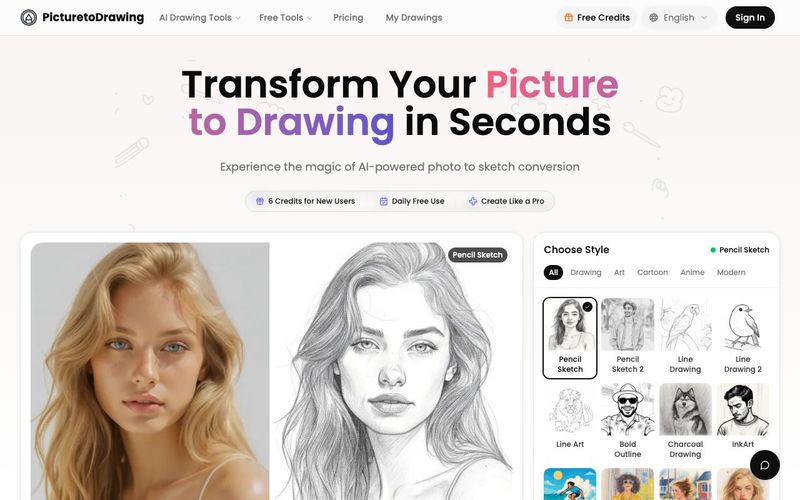
Picture to Drawing AI is a powerful and intuitive AI tool designed to transform ordinary photos into stunning artistic drawings within seconds. Built with advanced image generation technology, this tool lets anyone convert pictures into pencil sketches, watercolor paintings, line art, and color-pencil illustrations with professional artistic quality—completely free to try. Whether you're an artist, designer, marketer, or simply someone who loves creative visuals, Picture to Drawing AI makes it effortless to turn photos into hand-crafted artwork.
Professional-Quality Image Generation
What sets Picture to Drawing AI apart is its authentic artistic rendering. Every transformation preserves natural shadows, depth, texture, and fine details, resulting in artwork that looks like it was drawn by a real artist—not generated by software. High-resolution output ensures your converted drawings are perfect for printing, framing, and sharing across platforms.
Privacy is built into the core of this AI tool. All photos are processed securely and automatically deleted after use, so your images always remain private.
Multiple Artistic Styles Powered by Advanced AI
With this image generation AI tool, users can choose from a range of professionally crafted drawing styles:
Pencil Sketch for realistic graphite shading and timeless artwork
Line Drawing for clean, minimalistic contours and bold structure
Color Pencil Drawing for rich, layered color and warm artistic detail
Watercolor Painting for soft brushstrokes and dreamy, fluid tones
Each style recreates the unique aesthetics of hand-drawn art with exceptional accuracy.
Fast, Versatile, and Perfect for Any Creative Project
Picture to Drawing AI processes photos instantly, delivering high-quality results in seconds thanks to optimized AI rendering engines. Its versatility makes it ideal for:
Personalized gifts
Social media content
Marketing materials and branding
Home decoration
Educational and school projects
Creative portfolios and design showcases
Why Picture to Drawing AI Outperforms Traditional Filters
Unlike basic photo filters that often look flat, artificial, or overly processed, Picture to Drawing AI uses deep analysis to maintain texture, tone, and realism. The result is a natural artistic flow that imitates traditional drawing techniques with unmatched authenticity.
Picture to Drawing AI is more than a conversion tool—it’s a next-generation AI tool for image generation, enabling anyone to create artwork that feels personal, expressive, and professionally crafted.
How to Convert Picture to Drawing in 4 Simple Steps
Transform your photos into beautiful drawings with our easy-to-use picture to drawing converter. Upload, select style, and generate your drawing in seconds.
Upload Your Picture
Click to upload or drag and drop your photo. Supports JPG, PNG, WEBP, and HEIC formats. You can also try our sample images to see how picture to drawing conversion works.
Choose Drawing Style
Browse through multiple drawing styles including pencil sketch, charcoal, watercolor, ink, anime, and more. Each style gives your picture a unique artistic look.
Select Image Ratio
Pick your preferred aspect ratio for the picture to drawing output. Choose auto to keep original dimensions, or select 1:1, 3:4, 4:3, 9:16, or 16:9 based on your needs.
Generate and Download
Click the convert button to turn your picture to drawing. Get 1 free trial daily, or use credits for more conversions. Download your drawing in high resolution when ready.
How does the picture to drawing AI technology work?
Our advanced artificial intelligence analyzes your photo's composition, lighting, textures, and details to create authentic picture to drawing conversions. The AI understands artistic techniques like shading, line weight, and texture rendering to produce photo to sketch results that mimic traditional hand-drawn artwork. Unlike simple filters, our technology preserves the emotional essence and fine details of your original photograph.
What art styles are available for photo to sketch conversion?
Our picture to drawing converter offers multiple artistic styles including realistic pencil sketches, dramatic charcoal drawings, delicate watercolor paintings, bold ink illustrations, and colored pencil artwork. Each photo to sketch style uses different algorithms to achieve authentic artistic effects. You can experiment with various styles to find the perfect picture to drawing aesthetic for your image.
Is my photo safe when using your picture to drawing service?
Absolutely! Privacy and security are our top priorities. Your photos are processed on secure servers and automatically deleted after your picture to drawing conversion is complete. We never store, share, or use your images for any other purpose. All photo to sketch processing happens through encrypted connections, ensuring your personal photos remain completely private and secure.
How long does picture to drawing conversion take?
Processing time depends on your account type: Free users can expect conversions to complete within 50-60 seconds, while premium subscribers enjoy priority processing with results in just 20-30 seconds. Image size and complexity may slightly affect processing time, but our optimized AI servers ensure consistent quality regardless of speed.
What resolution can I download my photo to sketch results?
You can download your picture to drawing conversions in multiple resolutions, including the full resolution of your original photo. Our AI maintains image quality throughout the photo to sketch process, ensuring your artistic drawings are suitable for printing, professional use, or high-quality social media sharing. Premium users can access even higher resolution outputs for large format printing and commercial applications.
Can I use the picture to drawing converter on mobile devices?
Yes! Our photo to sketch converter works perfectly on smartphones and tablets. The responsive design ensures seamless picture to drawing conversion across all devices. You can upload photos directly from your mobile camera or gallery, apply artistic styles, and download results instantly. The mobile experience maintains all the features and quality of the desktop version, making artistic photo to sketch transformation available anywhere.
Do I need to sign up to use the picture to drawing converter?
While creating an account unlocks the full potential of our picture to drawing service, you can try our photo to sketch converter without signing up! Every day, you get one free picture to drawing conversion to experience our AI technology. Once your daily trial is used, you'll need to create an account to continue transforming your photos to drawings. Registered users enjoy unlimited picture to drawing conversions, faster processing speeds, and access to premium artistic styles for their photo to sketch creations.
실용적인 메모를 공유하고 다른 사람들이 이 도구를 평가하는 데 도움을 주세요.
아직 댓글이 없습니다. 대화를 시작하세요.


AI Image Extender는 생성형 AI를 사용하여 이미지를 원래 경계 너머로 확장하는 무료 온라인 도구입니다. 품질을 유지하면서 사진을 쉽게 언크롭하고, 가로세로 비율을 조정하고, 배경을 확장할 수 있습니다.

CreateForge AI는 Nano Banana, Seedream, Grok Imagine, Veo, Flux, GPT Image, Seedance를 포함한 다양한 AI 모델을 사용하여 이미지와 비디오를 생성할 수 있는 창작 작업 공간입니다. 프롬프트 작성, 모델 선택, 보호된 견적, 결과를 저장하는 비공개 라이브러리를 제공합니다.

FLUX, Stable Diffusion, Z Image Turbo, Qwen 등 멀티 모델 전환을 지원하는 무료 브라우저 기반 텍스트-투-이미지 도구입니다. 계정과 크레딧이 필요 없으며 즉시 다운로드할 수 있습니다. 호스트에 따라 제한이 있습니다.

SearchSpot은 항공편, 호텔, 식당, 교통을 비교하고 실시간 가격, AI 추론, 그룹 협업이 포함된 공유 일정을 만들어 주는 AI 여행 계획 도구입니다. 영구 무료입니다.



This comprehensive guide explores the best AI image generators available in 2026, highlighting their unique features, strengths, and ideal use cases. We'll dive deep into each tool's capabilities to help you identify which AI image generator best suits your creative needs.

Google has just launched a powerful AI IDE code editor — now you can really vibe while coding

The best AI Model And AI Tools in 2026,The Most Popular Free AI Model And AI Tools.