Подпишитесь на новости ИИ
Ваши данные полностью защищены. Мы никому их не передаём.
Create a caricature of me turns your photos into personalized caricatures. Upload your image and get unique caricature art with AI.
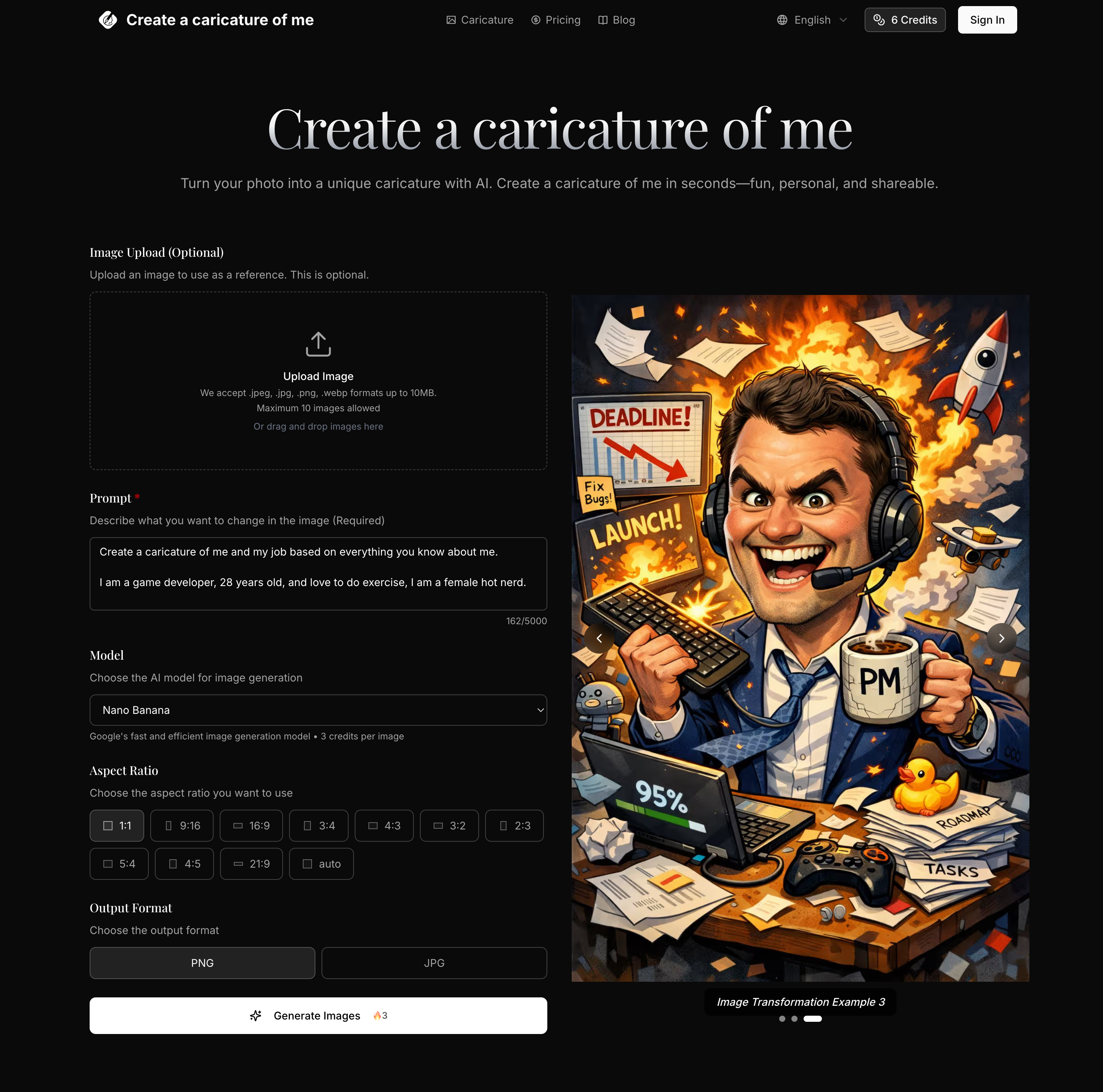
Create a Caricature of Me: A Fun and Powerful AI Tool for Image Generation
In today’s fast-growing AI tool landscape, creative applications like Image Generation are becoming more accessible than ever. Create a Caricature of Me is a standout example of how AI can turn everyday photos into engaging, personalized artwork within seconds. Designed for simplicity and speed, this tool allows users to transform a standard image into a unique caricature that is both recognizable and creatively enhanced.
At its core, Create a Caricature of Me focuses on delivering a seamless photo-to-art transformation experience. Users simply upload a clear image, describe their desired style, and let the AI handle the rest. This streamlined workflow eliminates the need for any design skills, making it an ideal AI tool for beginners while still offering enough flexibility for more advanced users. Whether you prefer a cartoon, sketch, anime, or fully customized style, the platform adapts intelligently to your prompt, offering diverse visual outputs from a single photo.
One of the key highlights of this Image Generation tool is its ability to maintain facial recognition and likeness while applying artistic transformations. Unlike generic filters, Create a Caricature of Me ensures that the final image still looks like you—just with added personality and creative flair. This balance between realism and stylization makes it perfect for profile pictures, social media content, or even personalized gifts.
Speed is another major advantage. Most caricatures are generated in just seconds, allowing users to experiment with multiple prompts and styles without long wait times. The tool also supports high-resolution outputs, ensuring that your final image is suitable not only for digital sharing but also for professional uses such as marketing materials, team avatars, or event posters.
Flexibility is further enhanced through support for multiple formats and aspect ratios, as well as compatibility with common file types like JPEG, PNG, and WEBP. For users who need more control, the platform allows adjustments to transformation strength and prompt detail, enabling fine-tuned results across different creative scenarios.
Additionally, Create a Caricature of Me offers scalable usage through free daily limits and premium plans with commercial licensing. This makes it a practical AI tool for both personal entertainment and business applications, including branding and advertising.
Overall, Create a Caricature of Me successfully combines ease of use, speed, and creative versatility, positioning itself as a highly effective AI tool in the Image Generation space. It empowers users to quickly turn ordinary photos into distinctive, shareable caricatures—making digital creativity more fun, personal, and widely accessible.
Choose a clear, well-lit photo of a face or full body. Create a caricature of me works best with front-facing or slight-angle shots.
Tell the AI how you want your caricature to look—cartoon, sketch, anime, or custom style. The more specific, the better your Create a caricature of me result.
Select aspect ratio and output format. Create a caricature of me supports multiple AI models for different looks and quality levels.
Click generate. Your Create a caricature of me image is ready in seconds. Download and share your unique caricature.
Image to Image uses your existing image as a starting point, maintaining its core structure while applying transformations. Text to Image creates completely new images from text descriptions with no visual reference point.
The best results come from clear, well-lit images with defined subjects. The system works with portraits, landscapes, product photos, and more. For optimal results, use images that match your desired output aspect ratio.
You can control transformation strength to determine how closely the output resembles your original image, specify detailed prompts to guide the AI, and generate multiple variations to choose from.
Most transformations complete in seconds, with more complex changes taking up to a minute. You can generate multiple outputs simultaneously to explore different options efficiently.
We accept JPEG, PNG and WEBP formats up to 24MB and 4096 x 4096 pixels. Output images are provided in high-quality formats optimized for your intended use.
Yes, paid subscription plans include commercial licensing rights, allowing you to use transformed images for business purposes including marketing, advertising, and product displays.
Free users can transform a limited number of images per day. Paid plans offer higher limits and additional features. Check our pricing page for detailed information on usage limits and subscription benefits.
Поделитесь практическими заметками и помогите другим оценить этот инструмент.
Пока нет комментариев. Начните обсуждение.


AI Image Extender — это бесплатный онлайн-инструмент, который с помощью генеративного ИИ расширяет изображения за их исходные границы. Легко устраняйте обрезку фото, изменяйте соотношение сторон и расширяйте фон, сохраняя качество.

CreateForge AI — это творческая рабочая среда, позволяющая генерировать изображения и видео с помощью различных моделей ИИ, включая Nano Banana, Seedream, Grok Imagine, Veo, Flux, GPT Image и Seedance. Она предлагает написание запросов, выбор модели, защищённые сметы и приватную библиотеку для хранения результатов.

Бесплатный браузерный инструмент для генерации изображений по тексту с переключением между моделями (FLUX, Stable Diffusion, Z Image Turbo, Qwen). Без аккаунта, без кредитов, мгновенное скачивание. Ограничения зависят от хостов.

SearchSpot — это AI-планировщик путешествий, который сравнивает перелёты, отели, рестораны и транспорт и формирует общий маршрут с актуальными ценами, AI-логикой выбора и групповой работой. Бесплатно навсегда.



This comprehensive guide explores the best AI image generators available in 2026, highlighting their unique features, strengths, and ideal use cases. We'll dive deep into each tool's capabilities to help you identify which AI image generator best suits your creative needs.

Google has just launched a powerful AI IDE code editor — now you can really vibe while coding

The best AI Model And AI Tools in 2026,The Most Popular Free AI Model And AI Tools.