AI 뉴스레터 구독
귀하의 데이터는 완전히 안전하게 보호됩니다. 어떤 누구와도 공유하지 않습니다.
Discover 4986 Midjourney --sref codes and style references to improve the aesthetic of your images generated using for Midjourney.
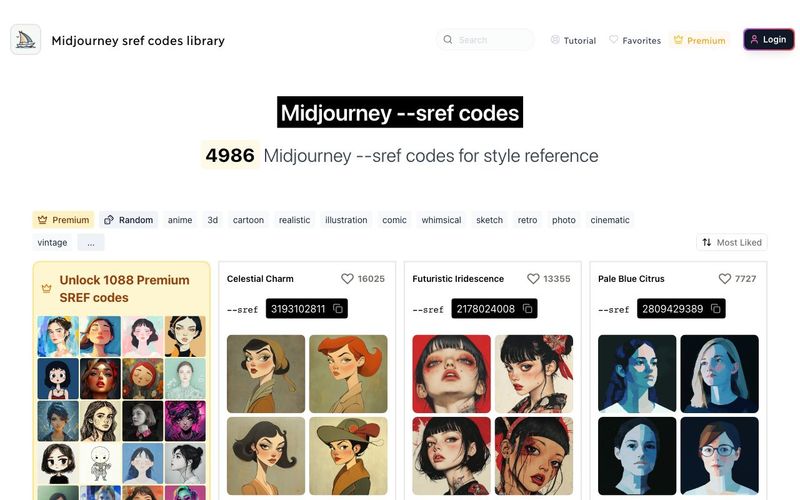
SREF codes (Style Reference codes) is a Midjourney feature that allows you to apply specific visual styles to your image generations.
A --sref code is a seed number (for example: 2213253170) that replaces complex style descriptions, making it easier to consistently create images with particular aesthetics.
To use --sref codes, you need to add the --sref parameter followed by the desired code number. You can easily copy sref codes from here by clicking on any code from this library.
Example: /imagine prompt: a serene landscape --sref 2213253170
SREF codes (Style Reference codes) is a Midjourney feature that allows you to apply specific visual styles to your image generations.
A --sref code is a seed number (for example: 2213253170) that replaces complex style descriptions, making it easier to consistently create images with particular aesthetics.
Yes, you can use multiple SREF codes to combine different styles. Simply add the --sref parameter once, followed by the codes you want to use.
Example: /imagine prompt: a serene landscape --sref 2213253170 4114158294
You can also weight the influence of each style by adding a colon and a number after the SREF code. Higher numbers give more influence.
Example: /imagine prompt: a serene landscape --sref 2213253170::2 4114158294::1
Midjourney allows you to use a random SREF code by using the keyword "random" instead of a specific code number. This can be a fun way to discover new styles and get unexpected results.
To use a random SREF code, simply add --sref random to your prompt.
Example: /imagine prompt: a serene landscape --sref random
You can also combine random SREF codes with specific ones or use multiple random codes:
/imagine prompt: a serene landscape --sref random 2213253170
/imagine prompt: a serene landscape --sref random random
After image generation, Midjourney will replace the "random" keyword with the actual SREF code number used, allowing you to see and reuse the specific style if desired.
Explore our SREF code library on this website to find codes that match your desired style. You can also experiment with different codes to discover new aesthetics.
Use tags to filter the library by style, for example: dreamlike art style.
SREF codes are easy to share and experiment with, and that's why we build this --sref codes library.
However, a sref code is just a number, so it's hard to know what it does.
That's why we tried to group them in categories do you can easily find --sref codes by art style.
For example, you can find --sref codes for fantasy art, with muted colors , or a cinematic art style easily.
실용적인 메모를 공유하고 다른 사람들이 이 도구를 평가하는 데 도움을 주세요.
아직 댓글이 없습니다. 대화를 시작하세요.


AI Image Extender는 생성형 AI를 사용하여 이미지를 원래 경계 너머로 확장하는 무료 온라인 도구입니다. 품질을 유지하면서 사진을 쉽게 언크롭하고, 가로세로 비율을 조정하고, 배경을 확장할 수 있습니다.

CreateForge AI는 Nano Banana, Seedream, Grok Imagine, Veo, Flux, GPT Image, Seedance를 포함한 다양한 AI 모델을 사용하여 이미지와 비디오를 생성할 수 있는 창작 작업 공간입니다. 프롬프트 작성, 모델 선택, 보호된 견적, 결과를 저장하는 비공개 라이브러리를 제공합니다.

FLUX, Stable Diffusion, Z Image Turbo, Qwen 등 멀티 모델 전환을 지원하는 무료 브라우저 기반 텍스트-투-이미지 도구입니다. 계정과 크레딧이 필요 없으며 즉시 다운로드할 수 있습니다. 호스트에 따라 제한이 있습니다.

SearchSpot은 항공편, 호텔, 식당, 교통을 비교하고 실시간 가격, AI 추론, 그룹 협업이 포함된 공유 일정을 만들어 주는 AI 여행 계획 도구입니다. 영구 무료입니다.



This comprehensive guide explores the best AI image generators available in 2026, highlighting their unique features, strengths, and ideal use cases. We'll dive deep into each tool's capabilities to help you identify which AI image generator best suits your creative needs.

Google has just launched a powerful AI IDE code editor — now you can really vibe while coding

The best AI Model And AI Tools in 2026,The Most Popular Free AI Model And AI Tools.