订阅AI通讯
您的数据完全安全。我们不会与任何人共享。
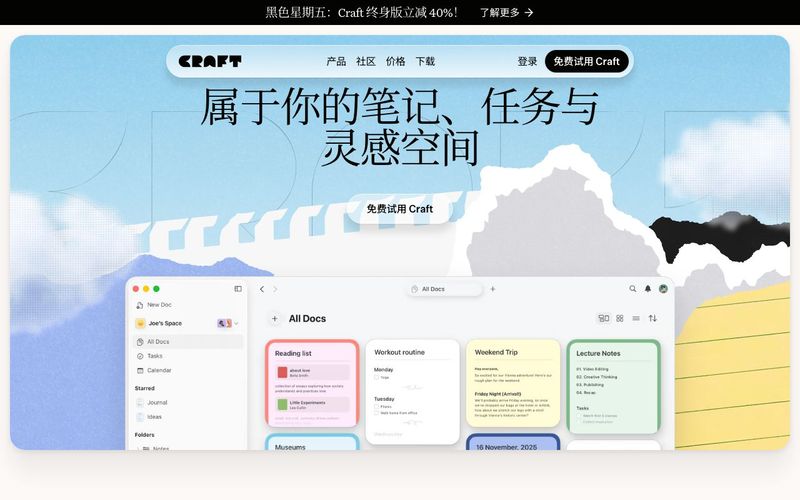
Visit the Craft official website or download the app from the app store (available for macOS, iOS, Windows, and Web).
Create an account or sign in (email and Apple ID login are supported).
Once logged in, you will see your default workspace (Space). From here, you can immediately start creating Pages or Documents.
In Craft, every page is made up of multiple Blocks — text, headings, lists, tasks, images, embedded content (PDFs, links, media), and more. Each of these can be added as a Block, allowing your ideas and notes to be reorganized and moved freely.
Want to capture an idea quickly? Simply click anywhere and start typing. Craft’s editor supports drag-and-drop rearranging, making it ideal for drafting, capturing inspiration, and organizing notes.
If you have web links, files, images, or even media content, you can embed them directly into your page — Craft supports rich embeds with automatic previews.
Use Spaces to separate different areas of your life or work (e.g., Work / Study / Personal / Projects). Each Space can contain its own pages and documents.
If you need structured data (such as reading lists, study archives, task databases), you can use Collections to turn pages into database-style records, making them searchable and filterable.
With Folders + Tags, you can further classify and label documents, giving your knowledge base or project management system a clear and multidimensional structure.
Craft’s editor is fast and responsive, perfect for frequent note-taking and capturing ideas. You can edit and save content even offline — everything syncs automatically when you're back online.
Want to turn ideas into actions? Craft allows you to embed To-Do tasks directly inside documents, keeping your notes and actionable items connected in one place.
For long-term projects, research, or study organization, Craft’s Whiteboards, visual layouts, and flexible formatting tools help make your content clearer, more readable, and easier to manage.
Craft supports exporting documents in multiple formats (PDF / Markdown / Text / etc.), making it easy to share your work with others or continue editing in other tools.
If you need collaboration or shared knowledge management, you can create a Space and invite others—enabling real-time editing and smooth teamwork.
Craft stands out as one of the most thoughtfully designed AI Office Tools, offering a seamless blend of writing, planning, and knowledge management. Whether you're taking quick notes, organizing long-term projects, or collaborating with a team, Craft provides an intuitive environment enhanced by modern AI capabilities. As an AI tool built for productivity, it simplifies how users capture ideas, structure information, and transform thoughts into polished documents.
Getting started with Craft is effortless. After downloading the app or accessing it on the web, users are introduced to their personal Space—a dedicated workspace where all writing and organization begins. Craft’s core strength lies in its block-based editor. Every note, heading, checklist, image, or embedded link becomes a movable block, giving users infinite flexibility for drafting and reorganizing ideas. The ability to embed PDFs, files, links, and media with instant previews makes Craft a powerful hub for research and document-heavy workflows.
Craft also excels in organization, positioning it among the leading AI Office Tools for structured thinking. Spaces help users separate different areas of their life or work, while Folders and Tags offer multidimensional categorization. Collections take organization further by transforming pages into database-style records—ideal for reading lists, study logs, or content repositories. This structured approach makes Craft especially valuable for students, researchers, creators, and professionals who need both fluid writing and robust data organization.
Productivity features elevate Craft even more. With offline editing, lightning-fast syncing, and embedded To-Do tasks, Craft allows users to connect ideas with actions effortlessly. Its Whiteboards and visual layouts make brainstorming and long-term planning more intuitive and engaging, merging creativity with clarity. These features reinforce Craft's position as a next-generation AI tool designed to enhance thinking, working, and learning.
Collaboration and exporting options add even greater versatility. Users can share spaces, co-edit documents in real time, or export content as PDF, Markdown, or text. This makes Craft a complete ecosystem for writing, planning, and teamwork.
Overall, Craft is not just a note-taking app—it is a comprehensive AI Office Tool that adapts to how users think, helping them build better ideas, better documents, and better workflows.


Flux 2 Max 是 Flux 2 系列中最先进的版本,专为追求高精度、真实感和生产级视觉输出的创作者而设计。作为一款高端的 AI 图像生成器(AI Image Generator) 与强大的 AI 图像编辑器(AI Image Editor) 的结合体,Flux 2 Max 将图像质量与一致性提升到了全新高度,非常适合专业级创作流程。
随着人工智能的飞速发展,11月成为了全年最具突破性的月份之一。从新一代图像模型和令人惊叹的视频工具,到能够编写代码、构建应用程序、清理杂乱数据,甚至从零开始创建完整学习中心的 AI 助手,应有尽有。无论你是创作者、营销人员、学生、开发者,还是仅仅是一位人工智能爱好者,本月的种种新发现都会让你重新思考人工智能的无限可能。

2025年最佳AI大模型与AI工具,最受欢迎的免费AI大模型与AI工具。

With the launch of the iOS 18.1 Beta version, registered developers can now experience some of the features of Apple AI, a cutting-edge addition to AI tools.