s1dashu

IP as Logo Skill

By s1dashuCreativeUpdated 2026-08-20
View Source

Skill.md

IP as Logo Skill is a practical choice for teams and individuals who need simple, approachable mascot images quickly and consistently. This skill is built around generating cute, rounded character designs with a strict simplification process, ensuring every output has a bold, clean silhouette and a manageable color palette of three semantic colors. It guides the AI to produce up to six distinct candidates from three proposed directions, giving you real options to compare after a single prompt. The emphasis on familiar animal mascots and extreme simplicity makes it ideal for startup branding, product placeholders, or pitch decks where a friendly visual identity matters but complex illustration is not feasible. One of its strengths is its focus on the final use case: it deliberately avoids prompting the model with terms like "logo" or "app icon," which can skew results, and instead pushes for a pure, character-first image that you can then apply to any asset. It also handles batch generation without filtering, so you see every result the model returns, which is useful for spotting unexpected but usable variations. The skill works with several major AI agents that support image generation, such as Codex, Coze, and Doubao, and it integrates cleanly via the Agent Skills CLI, making it easy to add to your existing workflow. If you need a fast, repeatable way to get cute, company-ready mascot concepts without overcomplicating the prompt engineering side, this skill delivers a straightforward, production-minded process that respects your time and the model's capabilities. It is particularly suited for developers, product managers, or small business owners who want to test mascot ideas before investing in a professional designer.

IP as Logo

ip-as-logo is a compact Agent Skill for generating extremely simple, cute, company-ready IP mascots. It prioritizes lovable character appeal, bold rounded silhouettes, strict complexity limits, oversized corner composition, and a solid named background color.

It follows the open Agent Skills format and is designed to work with any compatible AI agent, rather than being tied to a specific agent product.

You can also browse the free IP as Logo Skill website, a searchable library backed by Cloudflare R2 and Supabase.

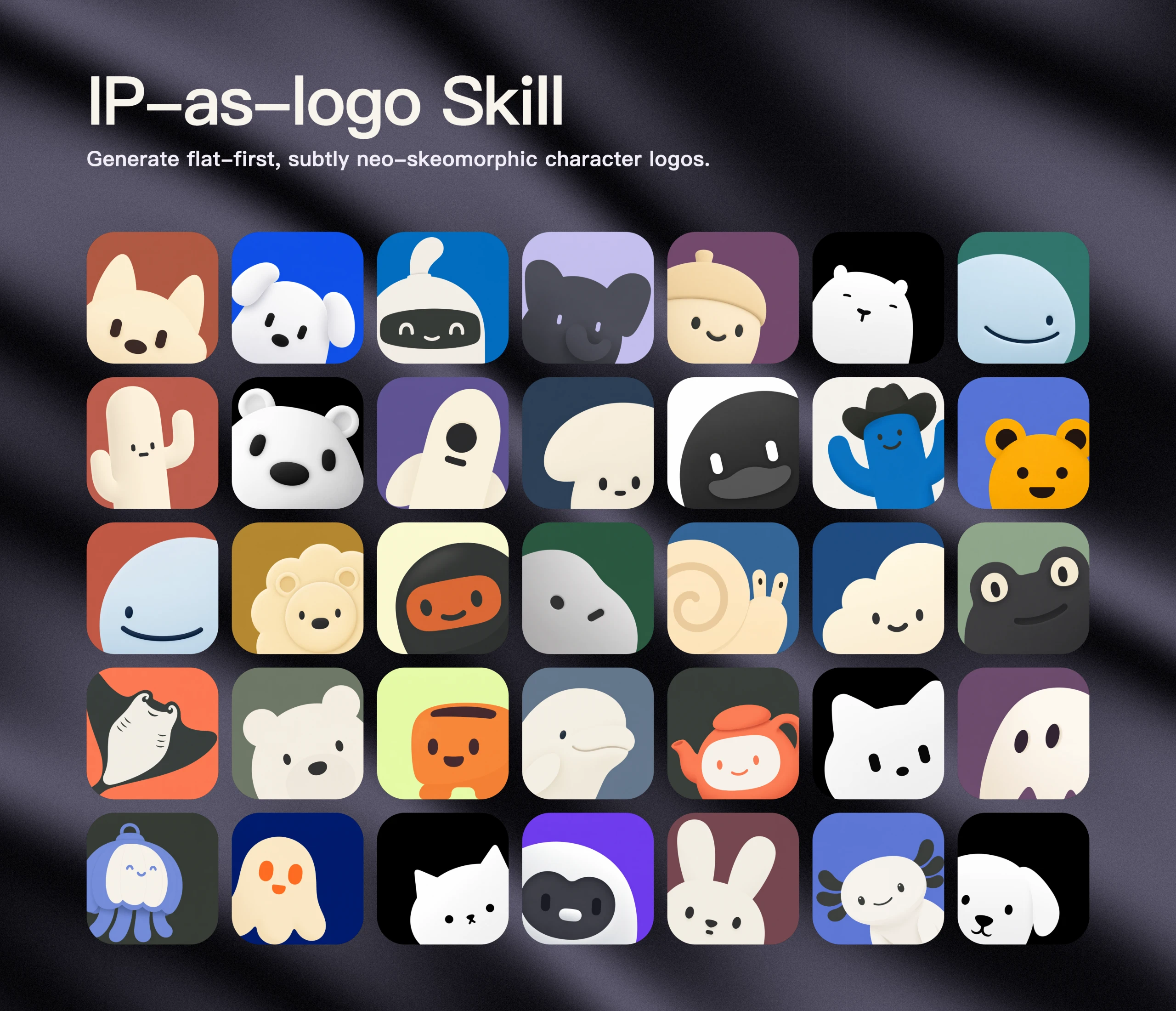
IP as Logo showcase

Don't have Codex, Doubao, Coze, or Workbuddy? Visit our website to download ready-made logos for free. Every logo is free for commercial use.

What it guides

  • One dominant silhouette built from roughly 4–7 large basic shapes
  • Three semantic colors by default: two IP base colors plus one background color
  • Three proposed directions followed by six independently generated candidates after user approval
  • Familiar, broadly appealing animals as the default open-ended subject; objects, machines, fantasy artifacts, and obscure creatures require a clear product reason
  • Context-aware, clearly separated subject and background colors with barely-there neo-skeuomorphic depth, described without percentages or prescribed gradient and shading formulas
  • Thick, rounded forms without sharp or fragile details
  • A 75–85% close crop that visibly peeks or rises from the lower-left or lower-right, with paired identifying features preserved
  • Extreme simplification, cute baby-like appeal, and removal of nonessential lines and details
  • One named solid background color filling the square, without image-mode language in the generation prompt
  • Image-only generation prompts that never reveal logo, brand-mark, app-icon, or icon-asset use
  • One-pass batch generation that preserves and delivers every returned image without filtering or automatic retries

Install

Install the complete skill with the Agent Skills CLI:

npx skills@latest add s1dashu/ip-as-logo-skill

The installer detects the repository's root SKILL.md, lets you choose a supported coding agent, and installs the complete ip-as-logo directory, including its supporting assets. Use --global for a personal installation available across projects:

npx skills@latest add s1dashu/ip-as-logo-skill --global

Agent compatibility

Supported agents include Codex, Coze, Doubao, YouMind, Manus, Gemini Apps, and Replit Agent. This skill only supports agents with built-in image-generation capabilities that can return generated images as assets.

Use

Ask your AI agent for an IP mascot image, for example:

Create a very simple, cute rounded ghost IP character on a solid deep navy background.

The skill does not ask for a color-mode choice by default. Every default candidate uses three semantic colors: two IP base colors plus one background color. It no longer reserves any fraction of the candidate set for two-color images. A two-color image is generated only when the user explicitly requests it, and then uses background-colored negative space for facial marks rather than introducing a third color.

When the user already names an IP subject, the skill proposes three controlled design treatments of that subject. When the subject is open, it proposes familiar animal mascots first and ties each to a product attribute or brand promise. In open-ended batches, 95–100% of candidates should be familiar animals; non-animal subjects are limited to a small minority with a direct product connection, never used merely to manufacture novelty.

Large batches create variety within commercially plausible animal mascots through species or breed, ear and muzzle proportions, expression, lower-left versus lower-right emergence, crop, silhouette, and secondary color organization. Clocks, locks, industrial tools, measuring instruments, vehicles, abstract machines, fantasy artifacts, and obscure creatures are not default company mascots.

If the skill runs inside a product repository, it inspects relevant read-only context before asking questions. If product context is insufficient, it asks one consolidated round of background questions. Once context is sufficient, it always presents three concise directions and proposes generating six independent images. It proceeds after the user agrees, or immediately when the user has already explicitly authorized six outputs.

When the user accepts all three directions, the default batch contains two variants per direction: A1, A2, B1, B2, C1, and C2. When the user selects one direction, the skill generates six controlled variants of that direction. If the user rejects the proposed quantity or distribution, their replacement instructions take precedence.

Compatible agents may generate the six candidates in parallel with subagents up to the runtime's available concurrency, using additional waves when needed. Codex can use ImageGen when available; other agent environments may use any configured image generator. If no generator is available, the skill asks the user to provide or enable one instead of pretending that an image was generated. Every result is a separate full-resolution square asset, never a six-image contact sheet.

When the user does not supply a palette, the skill favors clearly chromatic but restrained backgrounds rather than neon color or muddy gray. It keeps the normal design to exactly three semantic colors: two IP base colors plus the background. The generation prompt names the intended solid background color directly and avoids terms such as opaque, alpha, or transparency that may distract the image model from the desired visual result.

Although the project is named ip-as-logo, the prompt sent to the image generator describes only the requested square character image. It never calls the result a logo, brand mark, app icon, or icon asset, and it does not prepend use-case metadata that reveals those purposes.

Generation is intentionally treated as a creative draw. Each requested candidate is generated once and delivered as returned. The skill does not inspect transparency, block outputs, classify candidates as compliant or non-compliant, or automatically retry results because of their background, colors, composition, gradients, shading, or dimensionality. Users can explicitly request another draw or a refinement after reviewing the batch.

Repository structure

SKILL.md
assets/ip-as-logo-wall.webp
README.md
LICENSE

The skill itself intentionally consists of a single instruction document. The repository also includes the showcase image above, but no scripts, style references, or generation dependencies.

Model behavior

Image-generation models are stochastic and may interpret individual constraints differently. The skill preserves and returns every result without validation gates, transparency checks, automatic rejection, automatic retry, or silent repair.

License

MIT

Skill이란?

Skill은 AI 에이전트가 올바른 맥락, 도구, 절차로 특정 작업을 수행하도록 돕는 재사용 가능한 지침 패키지(보통 SKILL.md)입니다.

Agent Skills

Agent Skills는 Claude Code, Codex 같은 에이전트가 필요할 때 찾고 불러와 실행할 수 있도록 패키징된 기능입니다.

지원 에이전트 및 플랫폼

이 Skill은 SKILL.md 워크플로를 지원하는 에이전트 런타임용이며 OpenClaw, Claude Code, Codex 등에서 사용할 수 있습니다.

이 Skill 사용법

이 Skill을 설치하려면?

소스 저장소를 열고 설치 안내를 따르세요. 활성화 전에 스크립트와 권한을 확인하세요.

Skill을 실행하려면?

설치 후 에이전트에게 이름으로 Skill을 사용하도록 요청하거나 디렉터리에서 자동 발견하게 합니다.

내 프로젝트에 맞게 수정할 수 있나요?

네. Skill은 조정할 수 있지만 라이선스를 확인하고 안전 관련 핵심 지침은 유지하세요.

Community

Share practical notes and help others evaluate this skill.

0/2000

No comments yet. Start the conversation.

Subscribe to AI newsletter
Your data is complely secured with us. We don't share with anyone.