AIニュースレターを購読
あなたのデータは私たちと完全に安全です。誰とも共有しません。
Generate stencil-ready tattoo designs from text with AI. Explore minimalist, traditional, and geometric styles. Get 10 free credits on signup. Bring ideas to a real artist for final adjustments.
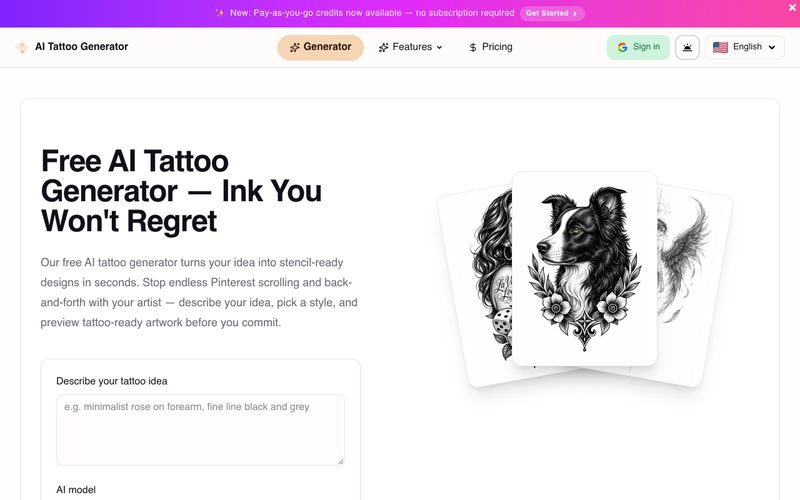
AI Tattoo Generator is a free online tool that turns your text descriptions into stencil-ready tattoo designs in seconds. Stop endless scrolling for inspiration – describe your idea, pick a style like minimalist or Japanese, and preview tattoo-ready artwork before you commit.
It's built specifically for tattoo planning, not generic image generation. It features style-aware AI prompts tuned for tattoo aesthetics, a community gallery for inspiration, and a private mode on paid plans for discreet design exploration.
Start with 10 free credits on signup and generate your first design in your browser – no drawing skills or downloads required.
An AI tattoo generator is an online tool that creates custom tattoo design drafts from your text description. You describe your idea, choose a style, and get stencil-ready artwork in seconds.
Yes. You get 10 free credits on signup to design tattoos directly in your browser – no download required. Upgrade for more credits and private designs.
Absolutely. If you only have a rough concept, describe it and the AI will turn it into custom tattoo ideas you can refine – a fast way to explore directions before booking an artist.
Browse and design across styles like minimalist fine line, traditional, Japanese, floral, geometric, blackwork, realism, and watercolor – in black & grey or full color.
The best one is purpose-built for tattoos, not generic art. Ours is tuned with style-aware prompts, a community gallery for inspiration, and a private mode for personal pieces.
No drawing skills needed. You describe your idea in plain words and the AI handles the artwork, so you can plan a tattoo even if you can't sketch.
AI drafts are a starting point, not a final skin-ready stencil. Always work with a professional tattoo artist who can adjust scale, contrast, and placement for your body.
You can download designs for personal use. Public designs may appear in the community gallery. Commercial use and redistribution are governed by our Terms of Service.
Each tattoo generation costs credits based on the model you pick: GPT 4 credits, Doubao Seedream 5 credits, and Google Banana (Pro) 8 credits. Making a public design private costs 1 credit. Free accounts start with 10 credits; subscription plans refresh credits every billing cycle.
Yes. Basic, Pro, and Studio subscribers browse and generate without ads. The free plan includes ads while you explore the generator and community gallery.
Private mode keeps your design visible only to you. Private designs are removed from the public Showcase and Explore style collections – ideal when you do not want others to see your concept before you get inked. Available on all paid plans.
Yes on the free plan – designs may appear in our community gallery and Explore pages. Basic, Pro, and Studio subscribers can toggle each design to Private.
Yes. Cancel from your account billing settings or contact support. You keep access until the end of your billing period; after that, new generations require an active plan or remaining free credits.
Yearly billing saves about 30% compared to paying monthly. Credits refresh on the same schedule either way – monthly allocations for Basic, Pro, and Studio.
Basic ($9.90/mo) is great for ad-free browsing and occasional designs. Pro ($15/mo) adds HD stencil files and more credits for regular creators. Studio ($30/mo) is best if you generate often and want priority in the queue.
You can buy 50 credits for $6.90 as a one-time payment. Credits never expire and you can stack multiple purchases. This is great if you want to pay per use without a subscription.
For support, you can contact the team via email at aizaizuori@gmail.com or use the contact form on the website. The FAQ section addresses common questions.
実用的なメモを共有し、他の人がこのツールを評価するのを助けましょう。
まだコメントはありません。会話を始めましょう。


AI Image Extender is a free online tool that uses generative AI to expand images beyond their original boundaries. Easily uncrop photos, adjust aspect ratios, and extend backgrounds while preserving quality.

CreateForge AI is a creative workspace that lets you generate images and videos using a variety of AI models, including Nano Banana, Seedream, Grok Imagine, Veo, Flux, GPT Image, and Seedance. It offers prompt writing, model selection, protected quotes, and a private library to store your results.

Free browser-based text-to-image tool with multi-model switching (FLUX, Stable Diffusion, Z Image Turbo, Qwen). No account, no credits, instant download. Host-dependent limits.

SearchSpot is an AI travel planner that compares flights, hotels, restaurants, and transport, and builds a shared itinerary with live prices, AI reasoning, and group collaboration. Free forever.



This comprehensive guide explores the best AI image generators available in 2026, highlighting their unique features, strengths, and ideal use cases. We'll dive deep into each tool's capabilities to help you identify which AI image generator best suits your creative needs.

Google has just launched a powerful AI IDE code editor — now you can really vibe while coding

The best AI Model And AI Tools in 2026,The Most Popular Free AI Model And AI Tools.