Suscríbete al boletín de IA
Tus datos están completamente seguros con nosotros. No los compartimos con nadie.
Create custom VRChat avatars online from text, images. Generate 3D models, add textures, auto rig, preview results, with our your VRChat avatar workflow.
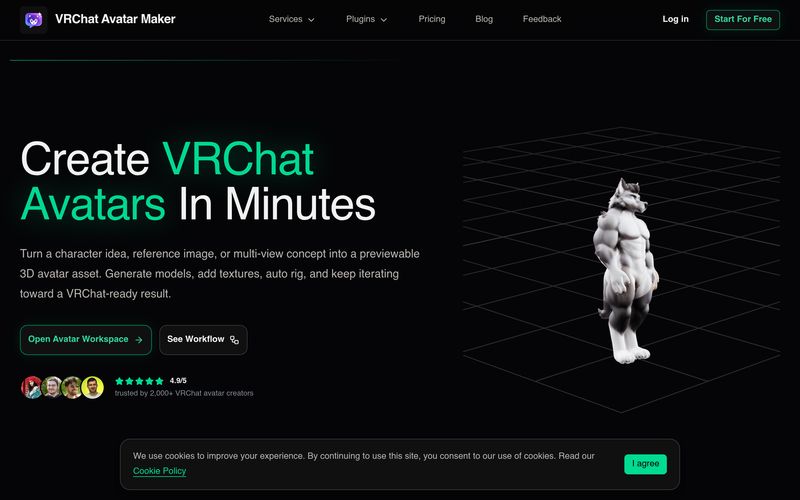
Creating a custom avatar for VRChat can be exciting, but the traditional process often requires multiple software tools, manual rigging, texture editing, and significant 3D design experience. This is where VRChat Avatar Maker stands out as a practical AI tool designed to simplify and accelerate the entire avatar creation process. Rather than generating only static images, this platform provides an end-to-end workflow that moves users from character idea to previewable, downloadable 3D avatar assets in minutes.
At its core, VRChat Avatar Maker combines intelligent Image Generation with 3D model creation, texturing, auto rigging, and preview capabilities inside one streamlined workspace. Whether users start with a text prompt, a single character image, or multi-view references, the platform transforms ideas into usable avatar models suitable for the VRChat ecosystem.
Unlike many standalone AI tool platforms that stop after generating a single image, VRChat Avatar Maker is structured around the actual workflow VRChat creators need. Users can begin with Text to Avatar, describing character appearance, clothing, mood, and overall style using natural language prompts. For users who already have inspiration, Image to Avatar and multi-view avatar generation allow uploads of front, side, or back reference images to improve consistency and character accuracy.
The platform also includes Text to Image functionality for concept exploration before committing to a full 3D model. This makes the Image Generation process more flexible, helping creators test colors, poses, outfits, and overall visual direction before investing further in production.
One of the biggest strengths of VRChat Avatar Maker is that it treats avatar creation as an evolving pipeline rather than a one-time output. Instead of restarting from zero every time, users can continue building on existing assets by refining textures, repainting surfaces, or adding materials through AI-assisted texture generation.
Another standout feature is Auto Rigging, which automatically prepares avatars for movement and animation. Motion presets such as idle and walk previews help creators inspect how models behave before export, moving projects closer to VRChat-ready quality without requiring advanced technical knowledge.
The platform emphasizes usability by allowing creators to preview generated images, 3D models, and rigged results directly in the workspace. Users can monitor task progress, check generation status, and decide whether to refine or download outputs.
For export flexibility, VRChat Avatar Maker supports downloadable GLB and FBX formats, making integration with VRChat creator workflows significantly easier.
Overall, VRChat Avatar Maker is more than a basic AI tool for Image Generation—it is a specialized creation platform built around the real needs of VRChat avatar creators. By combining concept generation, model creation, texturing, rigging, previewing, and downloadable assets into one workflow, VRChat Avatar Maker dramatically reduces the time and complexity involved in building custom avatars. Whether you want anime characters, furry avatars, cyberpunk styles, or fully personalized VRChat identities, this platform offers a faster and smarter way to bring virtual characters to life.
Start with Text to Avatar, Text to Image, Image to Avatar, Multi-image to Avatar, Add Texture, or Auto Rigging depending on what you already have.
Describe the avatar, upload a reference image, provide multi-view inputs, or select an existing generated model for the next stage.
See whether the task is generating, complete, deferred, or failed, then review the image, model, or rig preview directly in the workspace.
Save your current output, apply textures, auto rig the model, or download the asset and continue your VRChat avatar pipeline.
What is VRChat Avatar Maker?
VRChat Avatar Maker is a creator workspace that helps you turn a prompt, concept image, or reference set into a previewable 3D avatar asset and continue through texturing, rigging, preview, and download.
Can I create a custom VRChat avatar online?
Yes. You can start from text, a single image, or multi-view references to generate and refine a custom avatar asset online.
What creation modes are available?
The workspace supports Text to Avatar, Text to Image, Image to Avatar, Multi-image to Avatar, Add Texture, and Auto Rigging.
Can I use my own reference images?
Yes. You can upload one reference image or provide multi-view images such as front, left, back, and right to improve the result.
Can I continue editing a generated avatar later?
Yes. The workflow is designed so you can use one generated result as the starting point for texture updates, rigging, and later-stage refinement.
What file formats can I download?
Current outputs support GLB and FBX, which are useful for preview and downstream 3D asset workflows.
Is this only for experts in Blender or Unity?
No. The product is built to lower the barrier for users who want a VRChat avatar asset without already mastering the full 3D and SDK pipeline.
Does this help with anime or furry VRChat avatars?
Yes. The workflow is suitable for popular directions such as anime, furry, cute, and other custom avatar styles commonly searched by VRChat users.
Comparte notas prácticas y ayuda a otros a evaluar esta herramienta.
Aún no hay comentarios. Inicia la conversación.


AI Image Extender es una herramienta en línea gratuita que utiliza IA generativa para ampliar imágenes más allá de sus límites originales. Recorta fotos con facilidad, ajusta las relaciones de aspecto y extiende los fondos sin perder calidad.

CreateForge AI es un espacio de trabajo creativo que te permite generar imágenes y videos con diversos modelos de IA, incluidos Nano Banana, Seedream, Grok Imagine, Veo, Flux, GPT Image y Seedance. Ofrece escritura de prompts, selección de modelos, cotizaciones protegidas y una biblioteca privada para guardar tus resultados.

Herramienta gratuita de texto a imagen basada en el navegador con cambio entre varios modelos (FLUX, Stable Diffusion, Z Image Turbo, Qwen). Sin cuenta, sin créditos, descarga instantánea. Límites según el servidor.

SearchSpot es un planificador de viajes con IA que compara vuelos, hoteles, restaurantes y transporte, y crea un itinerario compartido con precios en vivo, razonamiento de IA y colaboración en grupo. Gratis para siempre.



This comprehensive guide explores the best AI image generators available in 2026, highlighting their unique features, strengths, and ideal use cases. We'll dive deep into each tool's capabilities to help you identify which AI image generator best suits your creative needs.

Google has just launched a powerful AI IDE code editor — now you can really vibe while coding

The best AI Model And AI Tools in 2026,The Most Popular Free AI Model And AI Tools.